![[CF | $34.95] Daily Rewards | by Mevent](/data/resource_icons/11/11802.jpg?1772508630)

Daily Rewards
Daily Rewards is a strong tool for Rust admins who want to keep their players engaged until the end of the wipe. You can provide your gamers with distinct daily rewards for logging in with this plugin. This way, you not only liven up gameplay, but also encourage longer playtime. With Daily Reward...
 codefling.com
For any questions or assistance, don’t hesitate to ask below—I’m happy to help!
About Daily Rewards
Daily Rewards is a strong tool for Rust admins who want to keep their players engaged until the end of the wipe. You can provide your gamers with distinct daily rewards for logging in with this plugin. This way, you not only liven up gameplay, but also encourage longer playtime. With Daily Rewards, don't lose the chance to draw in new players and keep returning ones!



 Features of Daily Rewards
- Beautiful and user-friendly interface
- Daily rewards for logging
- Motivating players to stay in the game longer
- Retention of players until the end of the wipe
- Compatibility with many plugins
- Edit rewards and config via in-game interface (no JSON editing required)
- By default, the plugin supports English, Russian, and Chinese languages
- Cooldown time before receiving an award
- Saving rewards in the plugin's inventory
- Do not receive rewards from inventory while in the build block, raid block, or combat block
Commands- daily – open daily rewards interface
- dailyrewards.wipe – wipe of player data
- dailyrewards.top [format: csv, empty (default)] [limit (10 is default)] – get a list of players with the day their award.
- dailyrewards.manage– manage daily reward settings
- dailyrewards.manage playtime set <steam_id> <amount> – sets the playtime for the specified player.
- dailyrewards.template [fullscreen/inmenu] [target_template]– sets the interface template for daily rewards.
- [fullscreen/inmenu]: Type of interface template to set. Valid values: fullscreen or inmenu.
- [target_template]: For the inmenu template, you must specify the template number (1 or 2).
 Permissions
- dailyrewards.use – allows you to open the DailyRewards menu
- dailyrewards.edit - allows you to enable edit mode
 Video
Video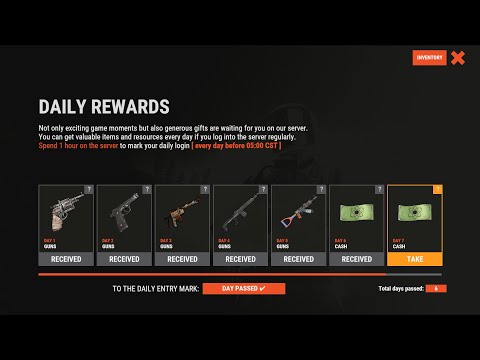
 FAQ
FAQQ: Where can I see an example of a config?
A: Config
Q: How do I add DailyRewards to the ServerPanel menu?
A: You can do this directly from the ServerPanel in-game:
1. Open the ServerPanel menu in-game.
2. If you have permission to edit, switch the panel to edit mode so you can see the blue "EDIT CATEGORY" and "EDIT PAGES" buttons.
3. Choose the category where you want DailyRewards to appear and click the "EDIT CATEGORY" button for that category.
4. While you are in this category in the ServerPanel, click the "EDIT PAGES" button to create a new page (or edit an existing one) for DailyRewards.
5. For that page, set these exact parameters:
- Type: Plugin
- Plugin Name: DailyRewards
- Plugin Hook: API_OpenPlugin
What's New in Version 1.1.14
Released Friday at 11:56 AM- [Added] Interval mode - new config option to use custom hour intervals for reward resets instead of daily (e.g. every 12 hours, every 48 hours)
- [Added] Configurable interval start date for precise control over when intervals begin
- [Updated] Daily and monthly resets now happen automatically at the scheduled time for all online players, without requiring reconnection
- [Updated] Reward availability now uses a more accurate reset counting system that correctly handles timezone changes and edge cases
- [Added] Support for loading images from local files

![[CF | $40.00] Loot Table & Stacksize GUI | by The_Kiiiing](/data/resource_icons/12/12085.jpg?1773884130)
![[CF | $19.99] Sentry Turrets | by Tangerine](/data/resource_icons/12/12014.jpg?1773367811)
![[CF | $14.99] Better Teams | by AhigaO](/data/resource_icons/11/11965.jpg?1773152722)
![[CF | $11.99] SkillTree: XP Event | by imthenewguy](/data/resource_icons/11/11801.jpg?1772499955)
![[CF | $14.99] Drop Bags | by Whispers88](/data/resource_icons/10/10781.jpg?1772500719)


