
Features
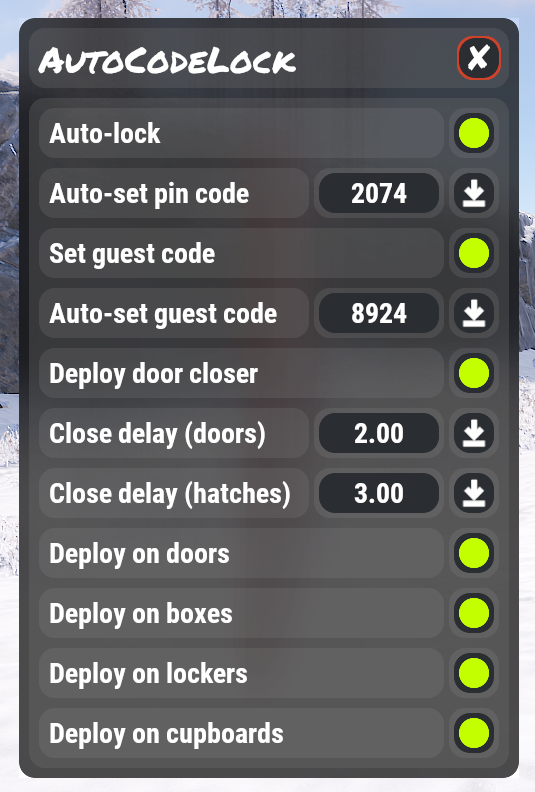
- Automatic deployment of codelocks on a variety of entities
- Allow users to set a default lock code, which is applied to auto-placed locks
- Allow users to update all their code lock codes with the click of a button
- Allow users to set a default guest code, which is applied to auto-placed locks
- Allow users to update all their codelock guest codes with the click of a button
- Allow users to deploy door closers on all doors they place
- Allow users to configure the close delay on door closers
- Allow users to sync close delay changes to all door closers they own
- Hides codes for users in streamer mode
- Easy to use dynamic user interface for user configuration
- Customizable UI coloring
- Automatic purging of old users from data file
Permissions
AutoCodeLock uses Oxides permission system
To assign a user permission use oxide.grant user "username|steam id" "permission" in console.
To assign a group permission use oxide.grant group "groupname" "permission" in console.
You can read more about how to use the permission system here : uMod - Permissions
autocodelock.autolock - Allows users to use the automatic lock deployment functionality
autocodelock.deploydoor - Allows users to toggle auto-deploy on door placement
autocodelock.deploybox - Allows users to toggle auto-deploy on storage box placement
autocodelock.deploylocker - Allows users to toggle auto-deploy on locker placement
autocodelock.deploycup - Allows users to toggle auto-deploy on tool cupboard placement
autocodelock.nolockneed - Allows users to have auto-deploy lock placement on entities without them needing a codelock in their inventory
autocodelock.doorcloser - Allows users to use the auto-deploy door closer functionality
Commands
/codelock - Opens the user interface. This command can be customized in the config file
Configuration
The configuration file can be found in your server directory at .../oxide/config/AutoCodeLock.json
The use of an editor and validator is recommended to avoid formatting issues


