A Rust server plugin that acts as a central control hub for all your server events. It automatically rotates,
schedules, and manages any event plugin you have installed -- from a single in-game interface. Players
can also propose and vote on which event to run next.
Feature Overview
Automatic Event Scheduling
> Automatically starts events on a timer without any admin intervention
> Choose between sequential rotation (cycles through events in order) or random rotation (picks a random event each
time)
> Set a minimum cooldown between automatic starts to prevent events from running too frequently
> Optionally delay automatic scheduling after a server reboot so players have time to connect first
Concurrent Events
> Run multiple events at the same time with a configurable limit on how many can be active simultaneously
> Set a "fill target" so the scheduler automatically tries to keep a specific number of events running at once
> When the limit is reached, the oldest event is automatically stopped to make room for the next one
Page 1/3
Independent Schedules
> Give specific events their own repeating timer, separate from the main rotation pool
> Useful for events that should always run on a fixed interval regardless of what else is happening (e.g., a recurring
airdrop every 30 minutes)
> Events on their own schedule don't count against the concurrent event limit
Player Voting System
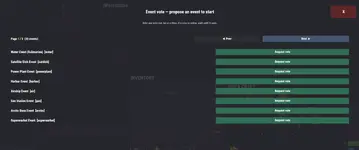
> Players can open a vote UI (/se or /startevent) to propose starting a specific event
> A server-wide popup appears for all online players to vote Yes or No
> If the vote passes (more Yes than No), the winning event starts automatically
> Only one vote can run at a time to prevent spam
> Players can also vote via chat command (/sevote yes or /sevote no)
> Configurable vote duration
Admin Control Panel (In-Game UI)
> Full in-game UI for admins (/es) -- no config file editing needed for day-to-day management
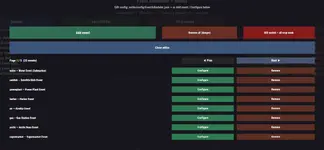
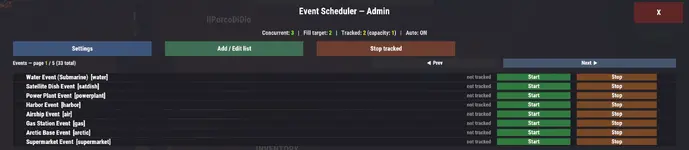
> Main screen shows all events with their tracking status, plus Start and Stop buttons for each
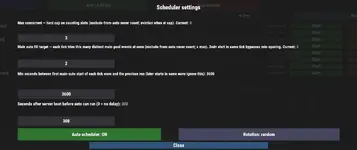
> Settings panel to adjust max concurrent events, fill target, auto interval, boot delay, rotation mode, and toggle the auto scheduler -- all live, no restart required
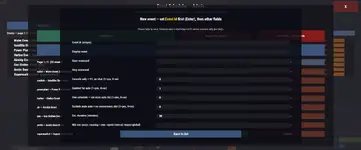
> Event editor to add new events, configure existing ones, or remove events entirely
> Paginated lists for servers with many events
Event Configuration (Per Event)
> Display name -- friendly name shown to players in UI and chat
> Start command and Stop command -- the commands that launch and end the event
> Estimated duration -- auto-clears the event slot when time is up
> Enabled for auto -- whether this event participates in automatic scheduling
> Exclude from auto -- keeps the event available for manual use but removes it from auto rotation and concurrency limits
> Console-only mode -- for plugins that only accept F1 server console commands
> Per-event cooldown override -- set a custom minimum interval different from the global setting
schedules, and manages any event plugin you have installed -- from a single in-game interface. Players
can also propose and vote on which event to run next.
Feature Overview
Automatic Event Scheduling
> Automatically starts events on a timer without any admin intervention
> Choose between sequential rotation (cycles through events in order) or random rotation (picks a random event each
time)
> Set a minimum cooldown between automatic starts to prevent events from running too frequently
> Optionally delay automatic scheduling after a server reboot so players have time to connect first
Concurrent Events
> Run multiple events at the same time with a configurable limit on how many can be active simultaneously
> Set a "fill target" so the scheduler automatically tries to keep a specific number of events running at once
> When the limit is reached, the oldest event is automatically stopped to make room for the next one
Page 1/3
Independent Schedules
> Give specific events their own repeating timer, separate from the main rotation pool
> Useful for events that should always run on a fixed interval regardless of what else is happening (e.g., a recurring
airdrop every 30 minutes)
> Events on their own schedule don't count against the concurrent event limit
Player Voting System
> Players can open a vote UI (/se or /startevent) to propose starting a specific event
> A server-wide popup appears for all online players to vote Yes or No
> If the vote passes (more Yes than No), the winning event starts automatically
> Only one vote can run at a time to prevent spam
> Players can also vote via chat command (/sevote yes or /sevote no)
> Configurable vote duration
Admin Control Panel (In-Game UI)
> Full in-game UI for admins (/es) -- no config file editing needed for day-to-day management
> Main screen shows all events with their tracking status, plus Start and Stop buttons for each
> Settings panel to adjust max concurrent events, fill target, auto interval, boot delay, rotation mode, and toggle the auto scheduler -- all live, no restart required
> Event editor to add new events, configure existing ones, or remove events entirely
> Paginated lists for servers with many events
Event Configuration (Per Event)
> Display name -- friendly name shown to players in UI and chat
> Start command and Stop command -- the commands that launch and end the event
> Estimated duration -- auto-clears the event slot when time is up
> Enabled for auto -- whether this event participates in automatic scheduling
> Exclude from auto -- keeps the event available for manual use but removes it from auto rotation and concurrency limits
> Console-only mode -- for plugins that only accept F1 server console commands
> Per-event cooldown override -- set a custom minimum interval different from the global setting