![PrivateTalk [1.8-1.13.2] |Rewrite Underway! NO 1.14 SUPPORT (YET).](/data/resource_icons/2/2081.jpg?1718365122)

THIS PLUGIN DOES NOT SUPPORT ABOVE 1.13.2! TOTAL RE-WRITE IS UNDERWAY! Follow progress here.
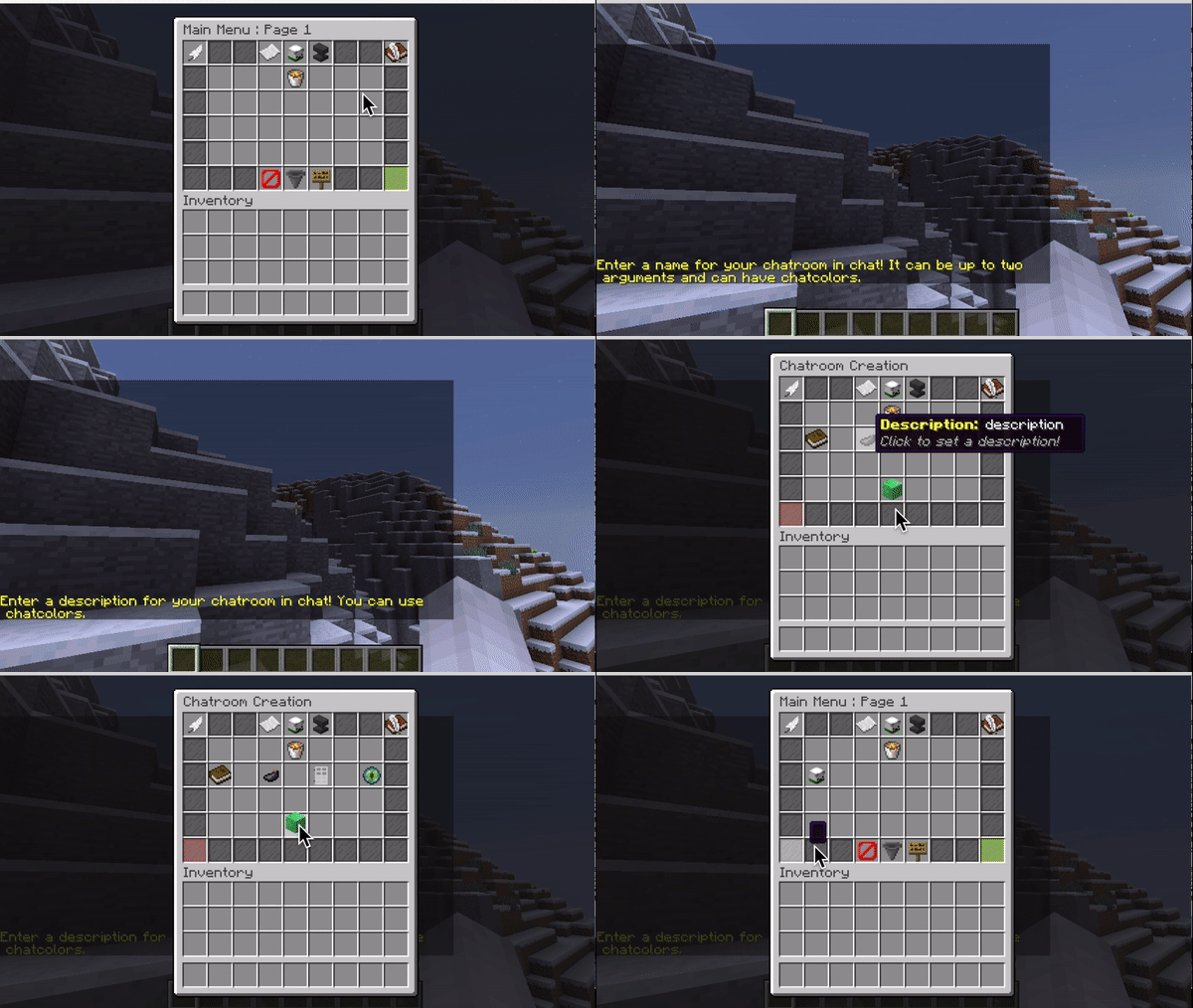
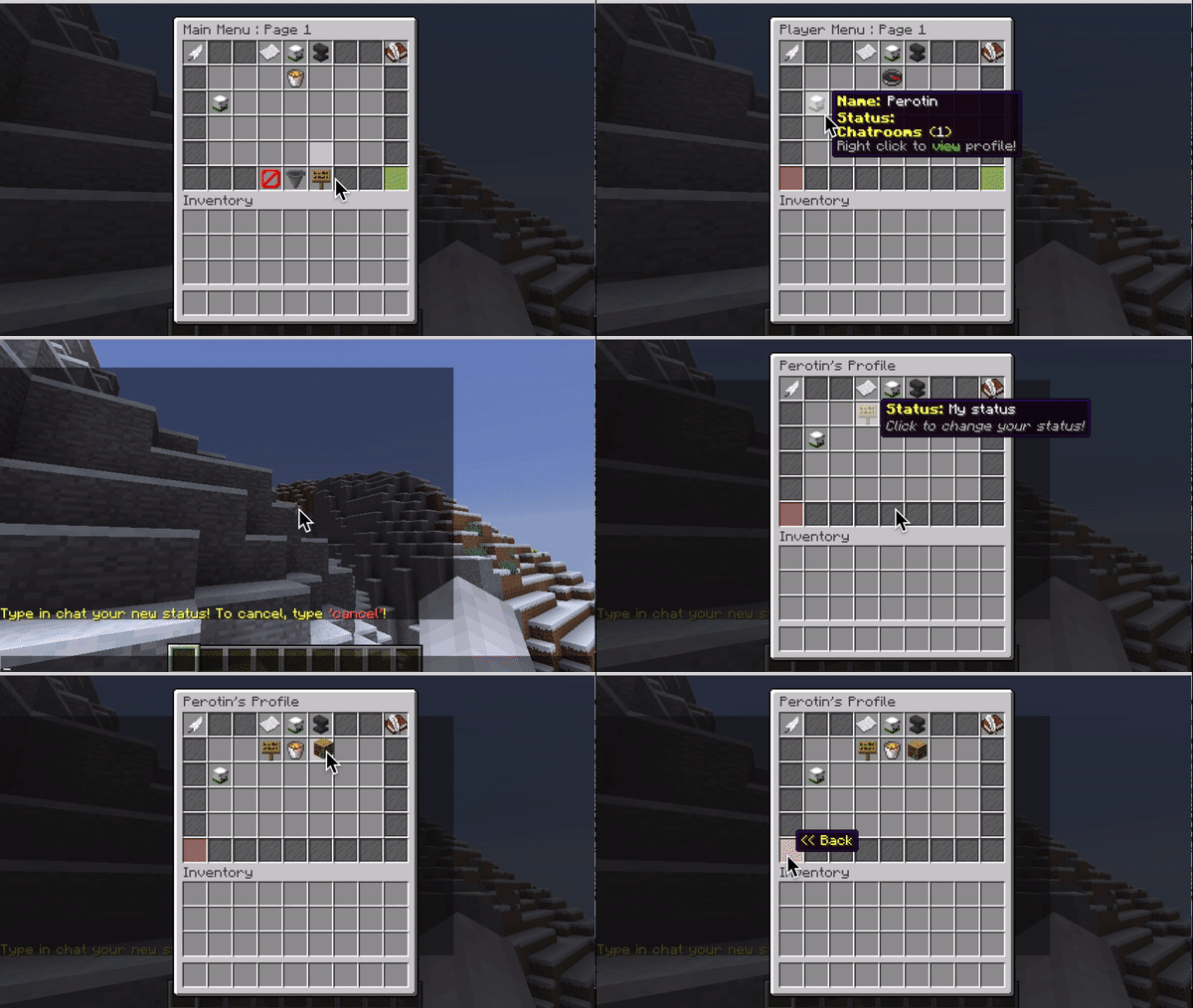

NOW WITH BUNGEECORD! Scroll down to features to read more!
PrivateTalkPremium is a remake of PrivateTalk, my first plugin on spigot. This plugin provides a fully dynamic chatroom manager solution all in a very flexible and smart series of menus. PrivateTalkPremium aims to revolutionize how chatrooms are perceived, instead of running a bunch of /party commands, you can easily do whatever you please with a few clicks of a button.
The actual layout of PrivateTalkPremium is very simple, chatrooms are represented as items in an inventory, and when clicked on open up a menu with details such as the description, private or open, and other various things (nicknames, ban menus).
So how can you use this plugin? In tons of ways. You can use it for staff chats, different lobby chats, offices (similar to teamspeak), roleplay chats, and the possibilities go on. This is plugin is truly one of a kind, and will make your server look much more professional than having millions of /party commands.
To get a better feel of this plugin and it's navigation, I highly suggest joining a server with the plugin installed (list of servers in spoiler) or watch one of the youtube videos below!
Plugin works from 1.8 - 1.13.2
3 different ways to chat in a chatroom
- Quick message
- Fast Chat
- Focused chat
Fast Chat - This is done by prefixing your message with an index key (1, 2, 3 etc) to quickly chat in multiple chatrooms at the same time. To find the index key, look in your player profile and see the order that your chatrooms appear in.
For example, if I am in a chatrooms: Staff Chat, Interview, and Special.
Doing: "1: Hello" will send a message to the staff chat. Subsequentially, doing "2: Hello" will send a message to the interview room. This goes on for as many chatrooms as you are in
Focused chat - This is done by selecting a chatroom to talk in, from that point on all message will go to selected chatroom.
You can select this feature here.



MySQL Bungeecord support
As of v2.0 there is now Bungeecord support (finally)!
To set this up, first take a look at your config.yml
Code:
# MySQL section

# Setting MySQL to true uses MySQL over storing information in files.
# If PrivateTalk cannot connect to your database, it will go back to using files.
# If you are getting the error "Too many connections!" run the following SQL query in your MySQL client
# "SET GLOBAL MAX_CONNECTIONS=200;" Copy the stuff within the quotes into your database and run the query.

use-mysql: false
host: "localhost"
database: "XYZ"
user: "root"
password: "123"

# How long should PrivateTalk wait before sending data to the database?
# Only required if you set use-mysql to true
# The number is in minutes.
time-period: 10
Set the following to the right credentials, (use-mysql to true or else there is no point to global chatrooms).
Next enable and disable the plugin (reload / restart) and let the MySQL tables generate.
To create a global chatroom it is very easy.

Set the following to true (must have the permission privatetalk.global to do this)
Now copy and paste your config file and PrivateTalk jar to every sever you wish to use Bungeecord with. Make sure they are all connected to the same database
Now your done. Simple as that. Global chatrooms will save to your MySQL database if set saved to true. Enjoy cross-server communications once and for all!
Full list of features
- Full message translation (messages.yml)
- Nicknames
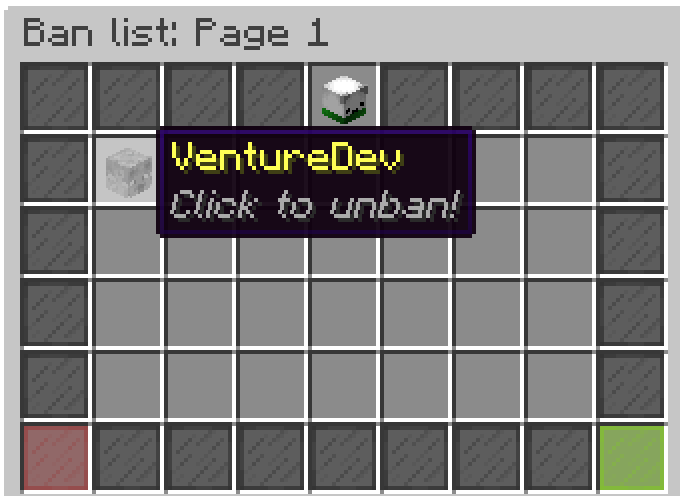
- Ban menus
- Kick menus
- Muting menus
- Player profiles
- Scrolling inventories
- Chat logs for every chatroom
- Ability to save certain chatrooms
- Multiple chatroom support
- Inboxes
- Admin menu
- Search function
- Mute globalchat
- Lots of tools (join random chatroom, leave all chatrooms)
- ChatColor support
- Works out of the box
- Help Menu
- Notification alerts when messaged
- Hover-text in all chatrooms
- Global chatroom muting
- Admin command
- Fast Chat system
- MySQL support
- *NEW* Bungeecord support
- *NEW* Server owned chatrooms
- PlaceholderAPI support
- All of the old features from PrivateTalk

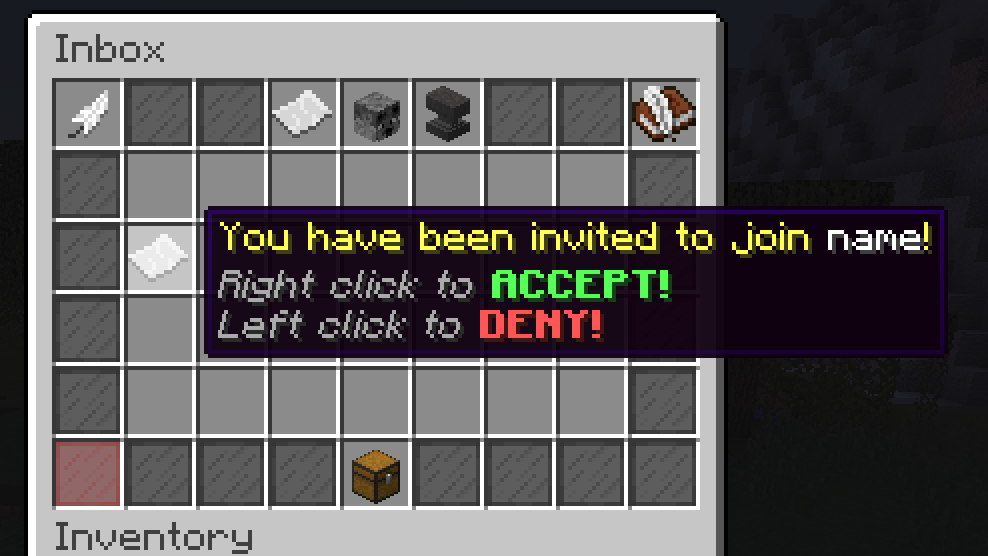
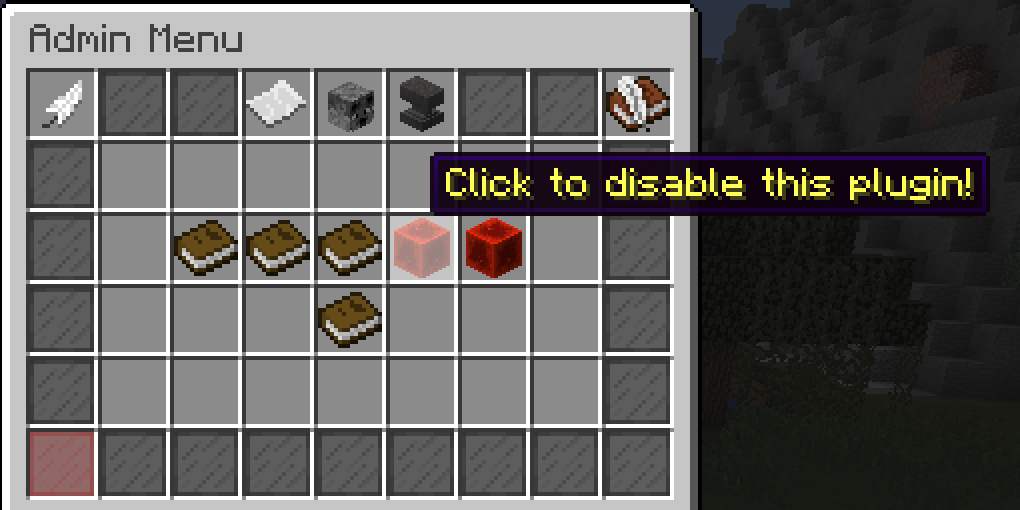


More videos and images coming very soon!
(If you can make a video displaying this, please let me know! Would be willing to give a free copy)

Commands
- /privatetalk or /pt - Open's the main menu
- /privatetalkadmin or /pta - Base command for the admin command
- /privatetalk globalchat - Toggles if player should only recieve chatroom chat
- privatetalk.use - Allows /privatetalk command
- privatetalk.save - Allows user to toggle whether any given chatroom should be saved that they own
- privatetalk.save.x - Allows user to toggle save for x amount of chatrooms they own
- privatetalk.save.* - Allows users to toggle save for infinite amount of chatrooms they own
- privatetalk.create - Allows user to create 1 chatroom
- privatetalk.create.x - Allows users to create x amoount of chatrooms
- privatetalk.create.* - Allows user to create an infinite amount of chatrooms
- privatetalk.join - Allows users to join 1 chatroom
- privatetalk.join.x - Allows users to join x amount of chatrooms
- privatetalk.join.* - Allows user to join an infinite amount of chatrooms
- privatetalk.global - Allows user to create global chatrooms
- privatetalk.admin - Parent perm for all permissions above, also base perm for /privatetalkadmin
- privatetalk.admin.* - Full access perm to everything in /pta
- privatetalk.admin.move - Access to /pta move
- privatetalk.admin.kick - Access to /pta kick
- privatetalk.admin.owner - Access to /pta owner
- privatetalk.admin.seeall - Base perm for /pta seeall
- privatetalk.admin.seeall.* - Full access perm to /pta seeall
- privatetalk.admin.seeall.all - Access to spy/see every chatroom
- privatetalk.admin.seeall.<chatroom> - Access to spy/see on specified chatroom
- privatetalk.admin.vanish - Appear as offline in all chatrooms

Code:
%privatetalk_chatroom_name%
%privatetalk_chatroom_description%
%privatetalk_chatroom_status%
%privatetalk_chatroom_player_count%
%privatetalk_chatroom_online_count%
%privatetalk_player_status%
%privatetalk_chatroom_saved%
Code:
#  |
#  |
#  | ᑭᖇᎥᐯᗩ丅ᗴ 丅ᗩᒪᛕ
#  |     ᑕᗝᑎᖴᎥǤᑌᖇᗩ丅Ꭵᗝᑎ
#  |
#  |
#
# Hello, thank you for using PrivateTalk Premium. If you require support, please feel free to join my discord.
# Discord link - https://discord.gg/5sc3xwK
# This is the quickest form of support. I will respond to discussions tab but it will not be as quick as my discord
# support.
#
#
# This is the configuration file for PrivateTalk Premium. Here you can change mechanics of this
# plugin like chat formats, and other various items.
#
# Here are the placeholders that will work in this file, note, only use placeholders that appear in the default message!
# $display$ - Displays player display name (i/e Pex, Essentials)
# $rank$ - Displays player's rank in chatroom (owner, moderator, member)
# $name$ - Displays player's name
# $nick$ - Displays player's nick name (in chatroom, not pex or essentials)
# $message$ - Displays message player sent in chat
# $chatroom$ - Displays chatroom's name in chat

# Note that $display$, $rank$, and $nickname$ will override any chat colors you provide them because
# these messages can be set by the user!


# character(s) to indicate a quick PM to a chatroom
quick-char: "@"

# formats for when chatting in a chatroom

# TO NOTE ---
# There is a hierarchy for $display$, $nickname$ and $name$ placeholders.
# If a player does not have a display name, it will then look for a nickname, if the player does not have a nickname,
# it will then use their name. The display name and nickname work the same way vice versa.
#
chat-format: "&7[&e$chatroom$&7] $rank$ $nick$ &7➣&e $message$"

# This is the type of block used to represent chatrooms that are saved
# To see this list that this accepts, refer to this
# https://hub.spigotmc.org/javadocs/spigot/org/bukkit/Material.html
material-for-saved: "SIGN"
Code:
#  |
#  |
#  | ᑭᖇᎥᐯᗩ丅ᗴ 丅ᗩᒪᛕ
#  |     ᗰᗴᔕᔕᗩǤᗴᔕ
#  |
#  |
#
# Hello, thank you for using PrivateTalk Premium. If you require support, please feel free to join my discord.
# Discord link - https://discord.gg/5sc3xwK
# This is the quickest form of support. I will respond to discussions tab but it will not be as quick as my discord
# support.
#
#
# This is the messages file for PrivateTalk Premium. Here you can change any message and it will appear in-game.
# ChatColors are supported, use '&' for ChatColor symbols.
# Messages are sorted alphabetically
#
# Note: I highly suggest NOT starting a message with a placeholder unless it's default starts with one.
# Doing so may cause bugs!
#
# '/' character is sometimes used to indicate seperate lines! Only use this when it's default has one.
#
# Here are the placeholders that will work in this file, note, only use placeholders that appear in the default message!
# - $player$ (placeholder for a player's name)
# - $chatroom$ (placeholder for a chatroom's name)
# - $number$ (placeholder for whenever a number is used)
# - $misc$ (placeholder for names, and other things)
# - $misc2$ (same as misc but used when need another placeholder)


about: "&eWhat is this?"
accepted: "&a&lACCEPTED"
admin-display: "&cAdmin tools"
admin-inventory: "Admin Menu"
already-owner: "&cYou already own a chatroom!"
already-in: "&cYou are already in a chatroom!"
already-in-chat: "&c$player$ is in your chatroom!"
already-invited: "&cYou already invited this player!"
already-focused: "&cAlready focused on &e'$chatroom$'&c!"

ban: "&cBan &e'$player$'"
banned-from: "&cYou are banned from &e'$chatroom$'&c!"
ban-list: "Ban list: Page $misc$"
ban-list-display: "&eBan list"
ban-list-lore: "&7&o'&a&o$number$&7&o' banned players!"

cancel: "cancel"
cannot-join: "&cInvite only!"
chatroom-inventory-title: "$misc$: Page $number$"
chatroom-removed: "&7[&e$chatroom$&7] &cChatroom is being removed! Say goodbye!"
click-to-chat: "&e&lIn chat: $misc$"
click-to-unban: "&7&oClick to unban!"
click-to-nick: "&7&oClick to set a nickname for $player$!"
clear-display: "&7&oClick to clear &a$number$&7&o invite(s)!"
close-display: "&eClose menu"
could-not-find: "&cCould not find a chatroom!"
could-not-find-search: "&eCould not find &c$player$&e! Type &c'$misc$'&e to cancel!"
confirm: "confirm"
confirm-deletion: "&eYou are about to delete &a$chatroom$&e. Type &a'$misc$' &eto confirm this, or type &c'$misc2$'&e to cancel!"
create-chatroom: "&eCreating a chatroom"
create-confirm-display: "&a&lConfirm?"
create-confirm-setlore: "&7&oClick to create chatroom!"
create-description-display: "&e&lDescription: &f$misc$"
create-description-setlore: "&7&oClick to set a description!"
create-display: "&7Click here to create a chatroom!"
create-item-display: "&e&lName: &f$misc$"
create-item-lore1: "&e&lStatus: &f$misc$"
create-item-lore: "&e&lOwner: &f$misc$"
create-item-lore3: "&7'$misc$&7'"
create-item-lore2: "&e&lMembers&f(&e$number$&f)"
create-inventory-title: "Chatroom Creation"
create-name-display: "&e&lName: &f$misc$"
create-name-setlore: "&7&oClick to set a name!"
create-saved-display: "&e&lSaved: $misc$"
create-saved-setlore: "&7&oClick to toggle saving!"
create-saved-noperm: "&7&oNo permission to save chatrooms!"
create-status-display: "&e&lStatus: $misc$"
create-status-setlore: "&7&oClick to toggle status"


date-format: "&7[day/month/year]"
disable-plugin: "&eClick to disable this plugin!"
disabling-plugin: "&c&lDisabling plugin! to confirm type $misc$, to cancel type $misc2$!"
disabling-error: "&cType either &a'$misc$'&c to confirm or '$misc2$' to cancel!"
delete-a-chatroom: "&eClick to delete a chatroom!"
deleted-chatroom: "&eYou have &cdeleted&e your chatroom!"
deletion-error: "&eTo confirm the deletion of &c'$chatroom$'&e,/ Type &a'$misc$'/&e To cancel, type &c'$misc2$'&e!"
deleting-chatroom: "&eYou are deleting &c'$chatroom$'&e./&eTo confirm type &a'$misc$'&e, to cancel type &c'$misc2$'&e!"
demote: "&cDemote &e'$player$'"
demoted: "&7[&e$chatroom$&7] &c$player$&e has been demoted from &cmoderator&e!"
denied: "&c&lDENIED"

enter-name-player: "Name of the player"
enter-name: "&eEnter a name for your chatroom in chat! It can be up to two arguments and can have chatcolors."
enter-description: "&eEnter a description for your chatroom in chat! You can use chatcolors."
enter-description-edit: "&eEnter a description for your chatroom in chat! Type&c '$misc$'&e to cancel!"
error-description-null: "&cPlease enter a description!"
error-name-null: "&cPlease enter a name!"
error-nicknaming: "&ePlease enter a nickname up to two words for &a'$player$'&e. To cancel type &c'$misc$'&e!"
error-occurred: "&c[PrivateTalk] An error has occurred! Try relogging to resolve this error or report to an admin!"
error-setting-player: "&ePlayer must be in your chatroom!"

false-message: "&cfalse"

given-ownership: "&eYou have given ownership of &a'$chatroom$'&e to &a$player$!"
go-back-display: "&e<< Back"

help-display: "&bHelp!"
help-inventory-title: "Help Menu"
help-lore: "&7Click to view help menu!"
help-expand: "&7&oClick to expand!"

in-no-chatrooms: "&cYou are not in any chatrooms!"
inbox-full: "&cPlayer's inbox is full!"
incorrect-args-deletion: "&ePlease type either '$misc$' or '$misc2$'!"
incorrect-args-set-owner: "&ePlease type the name of the player you wish to set as owner or type &c'$misc$'&e!"
invited: "&7You have been invited to &e$chatroom$&7!"
invited1: "&7Go to your inbox to accept the invite!"
invite-player: "&e&lClick to invite!"
inviting-multiple: "&eInviting: &f$player$"
invited-player: "&8You have invited &a$player$&8!"
invite-item-display: "&7You have &a$number$&7 pending invite(s)!"
invites-inventory-title: "Inbox"
invite-item-lore: "&7&oClick to view invites!"
invited-to: "&eYou have been invited to join&f $chatroom$&e!"

join-chatroom: "&eJoining a chatroom"
joined-chatroom: "&eYou have joined &a$chatroom$!"
join-display: "&e&lClick to join&a $chatroom$"

kick: "&cKick &e'$player$'"
kicked: "&cYou have been kicked from &e'$chatroom$'&c!"

leave-all-confirm-format: "&7&o$chatroom$, "
leave-all-cancel: "&c&lCancel."
leave-all-cancel-lore: "&7&oClick to cancel leaving &e$number$&7&o chatroom(s)!"
leave-all-confirm-lore: "&7&oClick to leave $misc$"
leave-all-display: "&cClick to leave all current chatrooms!"
leave-all-title: "Leave $number$ chatroom(s)!"
leave-display: "&cClick to leave &e'$chatroom$'"
leave-all-message-format: "&c$chatroom$&e, "
leave-all-message: "&eYou have left $misc$!"
leave-message: "&eYou have left &c$chatroom$&e!"

left-click-to-deny: "&7&oLeft click to &c&lDENY!"
lore-display: "&e&lDescription:&f $misc$"
lore-lore: "&7&oClick to change the description!"

main-inventory-title: "Main Menu : Page $number$"
member: "&7Member"
member-menu: "Member : $player$"
manage-chatroom: "&eManaging a chatroom"
mod-menu: "Mod : $player$"
moderator: "&cModerator"


name-in-use: "&cName is already in use!"
name-enter-error: "&eUh oh, try only using one or two words for the name!"
next-page-display: "&eNext >>"
new-ownership: "&eOwnership of &a$chatroom$&e has transitioned from &c$misc$&e to &a$misc2$"
nick: "&7Nickname: $misc$"
nick-person: "&7[&e$chatroom$&7] &eType the nickname for &a'$player$'&e, it can be up to two words. /&eType &c'$misc$'&e to cancel!"
nicknames: "&eNicknames"
nicknames-inventory: "Nicknames"
not-allowing-nicks: "&c$chatroom$ is not allowing nicknames!"
no-permission: "&cYou lack permission to do this!"
no-chatrooms-to-delete: "&cNo chatrooms to delete!"
not-accepting-invites: "&cCurrently not accepting invites!"
number-of-chatrooms: "&7You are in &a$number$&7 chatroom(s)!"
number-of-invites: "&a$number$&7 invite(s)!"
null-player: "&cCould not find &e'$misc$'&c!"

offline: "&cOFFLINE"
online: "&aONLINE"
owner: "&cOwner"

previous-page-display: "&e<< Previous"
private-message: "&cprivate"
promote: "&aPromote &e'$player$'&a to Moderator!"
promoted-to-mod: "&eYou have been promoted to &amoderator&e in &a'$chatroom$'&e!"
promoted-player: "&eYou have promoted &a'$player$'&e to moderator in &a'$chatroom$'&e!"
promoted-mod-all: "&7[&e$chatroom$&7] &a$player$&e has been promoted to &amoderator&e!"
please-enter-name: "&ePlease enter a player's name! To cancel, type &c'$misc$'!"
player-display: "&e$misc$"
player-kicked: "&7[&e$chatroom$&7] &c$player$ &ehas been &ckicked&e!"
player-banned: "&7[&e$chatroom$&7] &c$player$ &ehas been &cbanned&e!"
player-is-banned: "&c$player$ is banned!"
player-join: "&7[&e$chatroom$&7] &a$player$&e has joined!"
player-leave: "&7[&e$chatroom$&7] &c$player$&e has left!"
player-lore1: "&7$misc$"
player-lore2: "$misc$"
player-menu-title: "Player Menu : Page $number$"
player-menu-lore1: "&e&lChatrooms &e(&f$number$&e)"
player-menu-lore2: "&7Right click to &aview&7 profile!"
player-not-recognized: "&cCould not find player!"
player-menu-other-lore: "&7&oCurrently in &a$number$&7&o chatroom(s)!"
player-only: "&cSorry, but only players can use this command!"
player-profile-title: "$player$'s Profile"
player-profile-toggle: "&e&lAllow invites: $misc$"
player-profile-toggle-lore: "&7&oClick to change invite status!"
player-profile-status: "&e&lStatus:&f $misc$"
player-profile-status-lore: "&7&oClick to change your status!"
public-message: "&apublic"


random-display: "&8Click to join a random chat-room!"
reload-config: "&eClick to reload config.yml!"
reload-messages: "&eClick to reload messages.yml!"
reload-chatrooms: "&eClick to reload saved-chatrooms.yml!"
reload-players: "&eClick to reload players.yml!"
reloaded-config: "Reloaded the configuration file!"
reloaded-players: "Reloaded the players.yml file!"
reloaded-chatrooms: "Reloaded the chatrooms file!"
reloaded-messages: "Reloaded the messages.yml file!"
received-ownership: "&eYou have received ownership of &a'$chatroom$'!"
right-click-to-accept: "&7&oRight click to &a&lACCEPT!"

saved-display: "&e&lSaved: $misc$"
saved-lore: "&7&oClick to toggle saving!"
search: "&7&oSearch for a player!"
set-nickname-menu: "Click to set nickname!"
set-nickname: "&7[&e$chatroom$&7]&e Your nickname has been set to $misc$&e!"
select-chatroom-to-delete: "Click on the chatroom to delete!"
select-chatroom-to-invite: "Select chatroom to invite!"
search-for-player: "&eType in chat the name of the player you wish to search for in chat! To cancel, type &c'$misc$'&e!"
set-new-owner: "&eType in chat the name of the player you want to set as the new owner. To cancel, type &c'$misc$'&e!"
set-status: "&eType in chat your new status! To cancel, type &c'$misc$'&e!"
status-display: "&e&lCurrent status: $misc$"
shutting-down: "&c&lShutting down PrivateTalkPremium $misc$!"
status-display-lore: "&7Click to change the status for $chatroom$!"

too-many-chatrooms: "&cYou are in too many chatrooms to quick message!"
too-many-chatrooms1: "&7Please select a &echatroom &7to chat in!"
toggle-nicks: "&e&lAllow nicknames: $misc$"
toggle-nicks-lore: "&7&oClick to toggle!"
true-message: "&atrue"

unknown-chatroom: "&cUnknown chatroom!"
unbanned: "&7[&e$chatroom$&7]&e You have been &aunbanned&e!"
view-players-display: "&eView all players!"

you-have-deleted-chatroom: "&eYou have deleted &c'$chatroom$'&e!"


