
QuestsGUI (Alpha) is a plugin which displays clickable interfaces over select administrative menus and commands within the free Quests plugin (required). It's never been easier for you and your peers to create, modify, and conquer quests! As of the latest version, the following GUIs are available:
Quests Editor (/quests editor) has all major prompts fully configurable, but most minor prompts haven't been implemented yet.
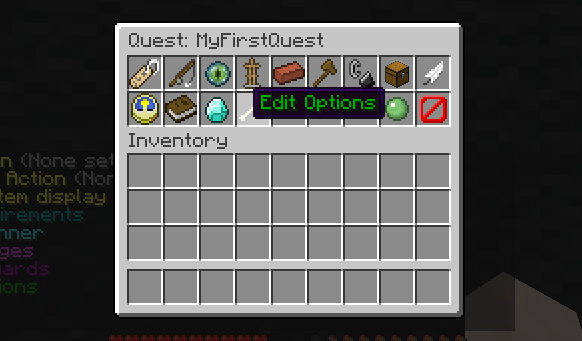
More images...
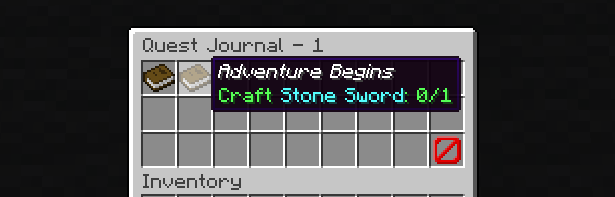
Quests Journal (/quests journal) is an alternative to the standard book journal and may be enabled by setting command.journal.enable: true in QuestsGUI's config file.
Quests List (/quests list) displays all available quests. Accepting quests from this menu may be enabled by setting click-to-take: true in QuestsGUI's config file.
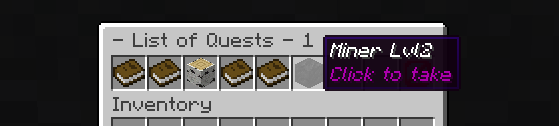
Each and every GUI item is configurable! Note that material names vary depending on Minecraft version:
- For MC 1.13 and up materials list, see https://hub.spigotmc.org/javadocs/bukkit/org/bukkit/Material.html
- For MC 1.8 to 1.12 materials list, see https://helpch.at/docs/1.12.2/index.html?org/bukkit/Material.html
YAML:
- SKULL_ITEM|2The value of '2' indicates a Zombie head, rather than a Skeleton head. MC 1.13 and up will ignore this value.
Submit feature/bug reports using the "Discuss This Resource" link.

Setup is a two-step process:
- Install minimum required version of Quests. Setup permissions as desired.
- Download the QuestsGUI jar and place it in your server's /plugins folder. Restart the server!



![Prestiges [1.8.8 - 1.21.x]](/data/resource_icons/8/8281.jpg?1718366102)
![Model Engine—Ultimate Entity Model Manager [1.19.4 - 1.21.x]](/data/resource_icons/10/10829.jpg?1768789147)

![Lib's Disguises [Premium]](/data/resource_icons/9/9461.jpg?1718366142)
