
Official page:
QuickMenu
Stop fiddling with commands! This plugin allows you to create arbitrary buttons and give each button a different command! After installing this plugin, players can open this menu with just one command, and then conveniently click buttons to execute various commands! At the same time, this plugin ...
 codefling.com
About QuickMenu
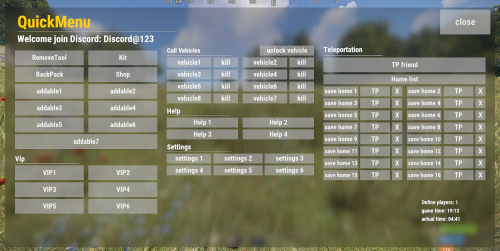
Stop fiddling with commands! This plugin allows you to create arbitrary buttons and give each button a different command! After installing this plugin, players can open this menu with just one command, and then conveniently click buttons to execute various commands! At the same time, this plugin also supports the middle mouse button function, allowing you to open menus without complicated binding of any key! I have created an initial template just like the picture Honestly, I've been using it for over a year, it's very convenient

Let's take a look at its details:
characteristic:
- When the button is clicked, there will be a click sound effect
- QuickMenu supports the middle mouse button to open the menu by default(Also applies when closed). If you don't want to use this function, you can enter the chat command /z to close. Of course, it only works for a single player, just like the DATA example below
- After disabling the middle mouse button function, you can also enter bind J chat.say /q in the F1 console to bind the J key shortcut to open the Quick Menu(Also applies when closed), where the J key can be replaced with other keys.


