
Official page:

Smurf Detection - Suspicious accounts and cheaters detector
Welcome to the Smurf Detection Plugin by Bnucket! This powerful tool helps you maintain a level playing field on your Rust server by detecting potential smurf accounts. - 🚨 Keep Your Rust Server Fair and Fun! 🚨 ⭐ Features Automatic Smurf Detection: Identifies potential smurf accounts as soon as p...
 codefling.com
About Smurf Detection - Suspicious accounts and cheaters detector
Welcome to the Smurf Detection Plugin by Bnucket! This powerful tool helps you maintain a level playing field on your Rust server by detecting potential smurf accounts.

- Keep Your Rust Server Fair and Fun!
Features
- Automatic Smurf Detection: Identifies potential smurf accounts as soon as players join.
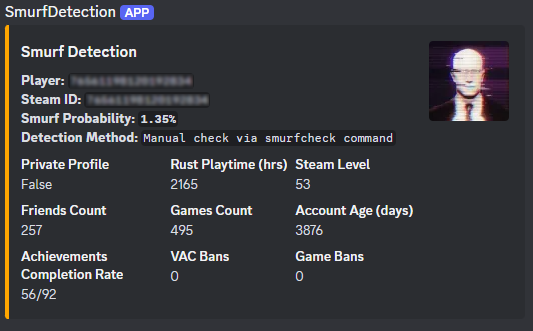
- Discord Integration: Sends alerts to your Discord server.
- Customizable Configurations: Tailor the plugin to meet your server’s specific needs.
- Whitelist Management: Exclude trusted players from smurf detection checks.
- Detailed Reports: Provides comprehensive player data and smurf probability.
- Player Connection: When a player connects to your server, the plugin fetches their Steam data.
- Data Analysis: The plugin analyzes various metrics like playtime, Steam level, friends count, game count, account age, achievements, and ban history.
- Probability Calculation: Using customizable thresholds, the plugin calculates the likelihood that the player is a smurf.
- Automated Actions: If the smurf probability exceeds your set threshold, the plugin can execute predefined commands (e.g., kick the player).
- Discord Alerts: Alerts are sent to a specified Discord channel, providing detailed player data and detection results.
Modify the plugin configuration to suit your needs:
Code:
{
    "SteamApiKey": "YOUR_STEAM_API_KEY",
    "DiscordWebhookUrl": "YOUR_DISCORD_WEBHOOK_URL",
    "MinPlayTime": 2000,
    "SmurfProbabilityThreshold": 85.0,
    "SmurfCommand": "kick {SteamID} Suspicious_account",
    "Whitelist": []
}

{
    "PlayTime": {"MinValue": 0, "MaxValue": 2000, "MinProbability": 35, "MaxProbability": 0},
    "SteamLevel": {"MinValue": 0, "MaxValue": 30, "MinProbability": 25, "MaxProbability": 0},
    "FriendsCount": {"MinValue": 0, "MaxValue": 50, "MinProbability": 5, "MaxProbability": 0},
    "GamesCount": {"MinValue": 0, "MaxValue": 40, "MinProbability": 20, "MaxProbability": 0},
    "AccountAge": {"MinValue": 0, "MaxValue": 1095, "MinProbability": 5, "MaxProbability": 0},
    "Achievements": {"MinValue": 0, "MaxValue": 92, "MinProbability": 4, "MaxProbability": 0},
    "VACBan": {"MinValue": 0, "MaxValue": 1, "MinProbability": 0, "MaxProbability": 3},
    "GameBan": {"MinValue": 0, "MaxValue": 1, "MinProbability": 0, "MaxProbability": 3}
}
Detailed Player Data
For each player, the plugin collects and analyzes:
- Playtime in Rust
- Steam Level
- Friends Count
- Games Count
- Account Age
- Achievements
- VAC and Game Bans
Stay informed with instant notifications on Discord:
- Player Name and Steam ID
- Smurf Probability
- Detailed Player Stats
- Detection Method (automatic/manual)
Commands
Console Commands:
- smurfcheck <playerName or steamId>: Manually check if a player is a smurf.
- whitelist <add/remove> <steamId>: Manage the whitelist.
- /smurfcheck <playerName or steamId>: Manually check via chat.
- /whitelist <add/remove> <steamId>: Manage the whitelist via chat.


