
Official page:
TT | Modern Hud - MCModels
Check out TT | Modern Hud on MCModels, along with a vast selection of other 3D models, textures, and graphics. Join MCModels to access top-tier assets and improve your creative projects!
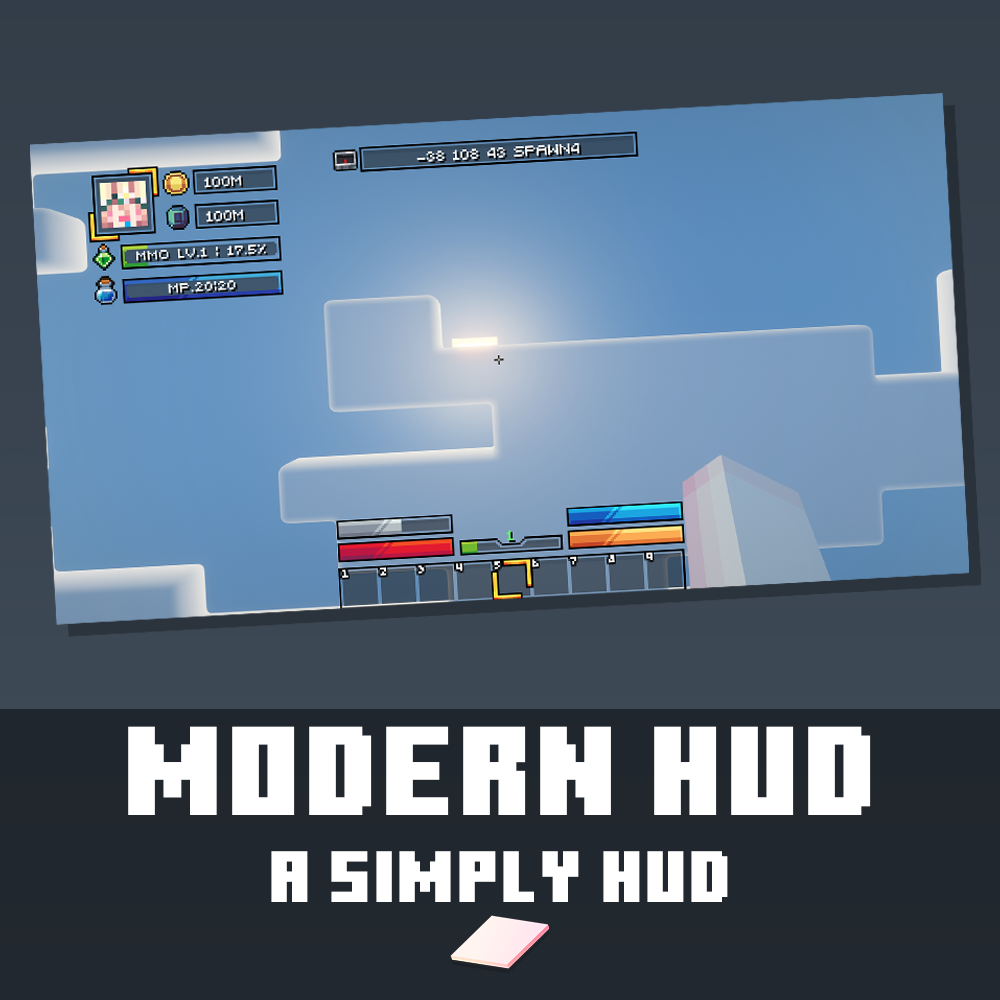
Modern & Simple HUD | Vanilla & MMO Versions | BetterHud Ready
Elevate your server's interface with a clean, modern, and eye-pleasing design! The Modern HUD is built on the concept of "simple yet comprehensive," providing your players with all essential information without cluttering their screen. It comes with pre-configured files so you can skip the tedious setup and get right to playing! Two Versions Included to Fit Your Server: You will receive 2 different HUD layouts to perfectly match your server's gameplay style:
 Vanilla Version: Perfect for Survival or standard servers. Displays all fundamental stats: Money/Balance, PlayerPoints, Player Position (XYZ), Health (HP), Hunger, Armor, and Air (Oxygen).
 MMO Version: Upgraded specifically for RPG/MMO servers. This layout adds a dynamic Level Bar (complete with percentage text) and a Mana Bar. (Note: This version requires the MMOCore plugin).
 Key Features:
- Player Profile: Beautifully showcases the player's avatar and essential information.
- Complete Status Bars: Custom-designed bars for HP, Hunger, Armor, and Oxygen.
- Dual Economy Display: Built-in support for both standard currency and PlayerPoints.
- MMO Ready: Perfectly synced Level and Mana bars for RPG gameplay.
- Drag & Drop Installation: Zero coding required! Just drop the files in and you're done.
 Dependencies:
- BetterHud (Optional)
- MMOCore (Optional - Required only for the MMO version)
- MythicHud (Optional)
- PlayerPoints (Optional - Required only if you want to display points)
 How to Install: Simply drag and drop the provided files into your BetterHud folder, reload the plugin, and enjoy your new interface!


