
Official page:
Zone Status
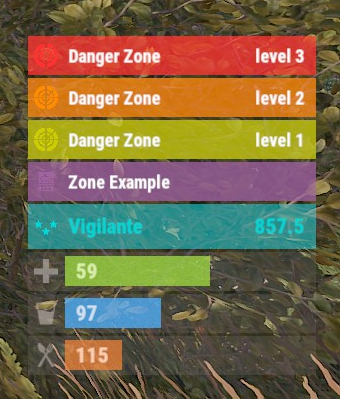
The plugin displays the current zone or monument to the player in the status bar. Depends on ZoneManager, MonumentsWatcher and AdvancedStatus plugins. P.S. The settings for each zone or monument are located in the "*SERVER*\oxide\data\ZoneStatus\" folder. The ability to display the player's curre...
 codefling.com
About Zone Status
The plugin displays the current zone or monument to the player in the status bar. Depends on ZoneManager, MonumentsWatcher and AdvancedStatus plugins.
P.S. The settings for each zone or monument are located in the "*SERVER*\oxide\data\ZoneStatus\" folder.

- The ability to display the player's current monument;
- The ability to automatically change monuments names when the player switches languages;
- The ability to display the player's current zone;
- The ability to enable or disable visibility for each of the zones;
- The ability to customize the style for each of the zones(in the data file);
- The ability to specify the order of the bar;
- The ability to change the height of the bar;
- The abillity to customize the color and transparency of the background;
- The ability to set a material for the background;
- The ability to switch between CuiRawImageComponent and CuiImageComponent for the image;
- The ability to get images from the local folder(*SERVER*\oxide\data\AdvancedStatus\Images);
- The abillity to set own image and customize the color and transparency of the image;
- The abillity to set sprite instead of the image;
- The ability to customize the color, size, font and outline of the text.


