



 19,174
Other sites won't delete your account info.
What does this do?
When you download models or resource packs from McModels, many files (.json, .bbmodel, .yml, .png, .ogg) still contain amodel_identifierfield that ties the content to the uploader’s account. This script automatically finds and removes every trace of those IDs from all supported file types, then repacks everything into a clean .zip file with a unified date (01/04/2026). You can drop a folder, a .zip, or a .rar onto it – it handles the rest.Requirements
- Python 3.7 or newer – Download from python.org
- Optional libraries (recommended for full PNG/OGG metadata cleaning):
If you skip these, the script still cleans JSON, BBModel and text files perfectly.Code:pip install Pillow mutagen rarfile
- Save the script as remove_credits.py anywhere you like.
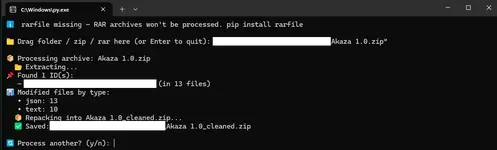
- Drag & drop (easiest): Run the script (double‑click or python remove_credits.py). When asked, drag your folder, .zip or .rar file into the console window and press Enter.
- The script scans every file, shows found IDs, cleans them, and creates a new file named
<original>_cleaned.zipin the same location. - You can keep processing more items in the same session – just answer
ywhen prompted.
- JSON / .bbmodel / .mcmeta – removes the model_identifier key and any line containing the ID.
- Text files (.txt, .yml, .yaml) – deletes comment lines with the ID, model_identifier entries, and any leftover ID strings.
- PNG images – scrubs the ID from text metadata (author, description). (Needs Pillow)
- OGG audio – scrubs the ID from Vorbis comments (artist, title). (Needs mutagen)
_cleaned.zip. The original folder or archive stays untouched. The output .zip always has all file dates set to 01/04/2026 so the pack doesn’t leak original timestamps.Check your cleaned pack with WinDirStat
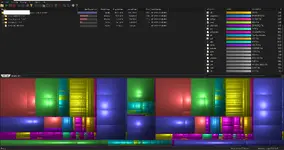
If you want to be absolutely sure no personal information remains in your pack, you can visually inspect its contents with [WinDirStat](https://windirstat.net/) (Windows Directory Statistics). It shows every file inside a folder or `.zip` as coloured rectangles, making it easy to spot leftover `.txt`, `.yml` or other files that shouldn't be there.1. Download WinDirStat from [windirstat.net](https://windirstat.net/).
2. Extract your `_cleaned.zip` to a new folder.
3. Launch WinDirStat and select that folder (or directly open the `.zip`).
4. Look for suspicious file names, unusually large comment blocks, or any file you don’t expect – if the script worked, you’ll only see the intended resources, nothing more.
This step is entirely optional, but it gives extra peace of mind that your pack is completely clean.
Attachments
Last edited: