
Official page:


This plugin requires the Chaos extension -> https://chaoscode.io/resources/chaos.321/
Contents

Features
Permissions
AutoCodeLock uses Oxides permission system
To assign a user permission use oxide.grant user "username|steam id" "permission" in console.
To assign a group permission use oxide.grant group "groupname" "permission" in console.
You can read more about how to use the permission system here : uMod - Permissions
autocodelock.autolock - Allows users to use the automatic lock deployment functionality
autocodelock.deploydoor - Allows users to toggle auto-deploy on door placement
autocodelock.deploybox - Allows users to toggle auto-deploy on storage box placement
autocodelock.deploylocker - Allows users to toggle auto-deploy on locker placement
autocodelock.deploycup - Allows users to toggle auto-deploy on tool cupboard placement
autocodelock.nolockneed - Allows users to have auto-deploy lock placement on entities without them needing a codelock in their inventory
autocodelock.doorcloser - Allows users to use the auto-deploy door closer functionality
Commands
/codelock - Opens the user interface. This command can be customized in the config file
/closer - When looking at a door, using this command will allow you to place/remove a door closer
/codelock.skin - This will let you select the skin used for codelocks when placing a door and having it auto-lock.
You will only be allowed to select a codelock skin that you own.
This only applies to players with the "autocodelock.nolockneed" permission when placing a lock with needing one in your inventory. When the plugin consumes a lock from your inventory it uses the skin of that item
Configuration
Contents
- • Features
- • Permissions
- • Commands
- • Configuration
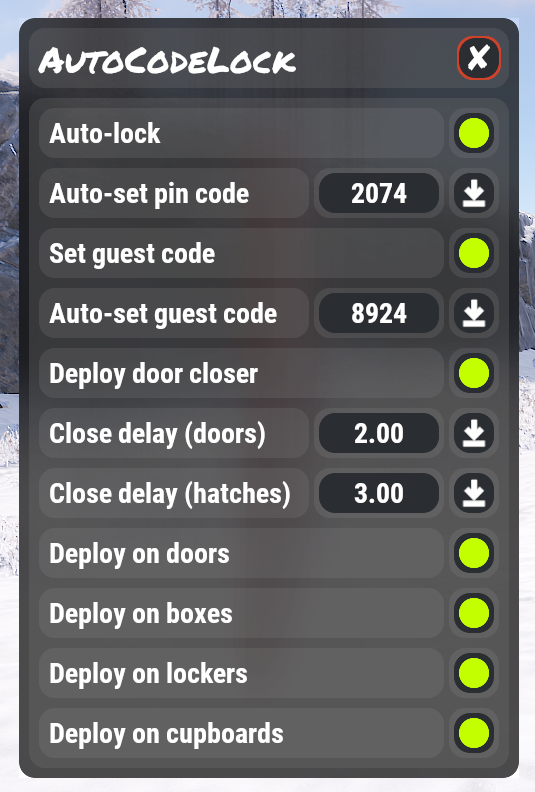
Features
- Automatic deployment of codelocks on a variety of entities
- Allow users to set a default lock code, which is applied to auto-placed locks
- Allow users to update all their code lock codes with the click of a button
- Allow users to set a default guest code, which is applied to auto-placed locks
- Allow users to update all their codelock guest codes with the click of a button
- Allow users to deploy door closers on all doors they place
- Allow users to configure the close delay on door closers
- Allow users to sync close delay changes to all door closers they own
- Hides codes for users in streamer mode
- Easy to use dynamic user interface for user configuration
- Customizable UI coloring
- Automatic purging of old users from data file
Permissions
AutoCodeLock uses Oxides permission system
To assign a user permission use oxide.grant user "username|steam id" "permission" in console.
To assign a group permission use oxide.grant group "groupname" "permission" in console.
You can read more about how to use the permission system here : uMod - Permissions
autocodelock.autolock - Allows users to use the automatic lock deployment functionality
autocodelock.deploydoor - Allows users to toggle auto-deploy on door placement
autocodelock.deploybox - Allows users to toggle auto-deploy on storage box placement
autocodelock.deploylocker - Allows users to toggle auto-deploy on locker placement
autocodelock.deploycup - Allows users to toggle auto-deploy on tool cupboard placement
autocodelock.nolockneed - Allows users to have auto-deploy lock placement on entities without them needing a codelock in their inventory
autocodelock.doorcloser - Allows users to use the auto-deploy door closer functionality
Commands
/codelock - Opens the user interface. This command can be customized in the config file
/closer - When looking at a door, using this command will allow you to place/remove a door closer
/codelock.skin - This will let you select the skin used for codelocks when placing a door and having it auto-lock.
You will only be allowed to select a codelock skin that you own.
This only applies to players with the "autocodelock.nolockneed" permission when placing a lock with needing one in your inventory. When the plugin consumes a lock from your inventory it uses the skin of that item
Configuration
JSON:
{
  "Chat command": "codelock",
  "Other Options": {
    "Use prefix in chat messages": true,
    "Admins bypass restrictions": false,
    "Prevent use if player is raid blocked": true,
    "Prevent use if player is combat blocked": false,
    "Prevent pick up of door closes": true
  },
  "Delay Options": {
    "Door closer": {
      "Minimum": 2.0,
      "Maximum": 15.0
    },
    "Ladder hatch": {
      "Minimum": 3.0,
      "Maximum": 15.0
    }
  },
  "Default Settings": {
    "Auto-lock on placement": false,
    "Deploy on doors": false,
    "Deploy on boxes": false,
    "Deploy on lockers": false,
    "Deploy on cupboards": false,
    "Deploy door closer": false,
    "Door close delay": 3.0,
    "Ladder hatch close delay": 5.0,
    "Use guest code": false,
  },
  "Data Management": {
    "Save data in ProtoBuf format": false,
    "Purge user data after X days of inactivity (0 is disabled)": 7
  },
  "UI Colors": {
    "Background": {
      "Hex": "151515",
      "Alpha": 0.94
    },
    "Panel": {
      "Hex": "FFFFFF",
      "Alpha": 0.165
    },
    "Button": {
      "Hex": "2A2E32",
      "Alpha": 1.0
    },
    "Highlight": {
      "Hex": "C4FF00",
      "Alpha": 1.0
    },
    "Close": {
      "Hex": "CE422B",
      "Alpha": 1.0
    }
  },
  "Version": {
    "Major": 3,
    "Minor": 0,
    "Patch": 0
  }
}


