
Official page:

SkinBox
Allows you to reskin item's by placing it in the SkinBox and selecting a new skin
 chaoscode.io
Required Dependencieshttps://chaoscode.io/resources/chaos.321/
https://umod.org/plugins/player-dlc-api
This plugin require the Chaos extension -> https://chaoscode.io/resources/chaos.321/
⚠ To make use of the automated skin filtering you will need the Player DLC API plugin
https://umod.org/plugins/player-dlc-api
⚠ Facepunch have changed their TOS regarding DLC/paid content ⚠
As of August 7th 2025, it is not allowed to grant users access to paid DLC that they do not own.
That includes all Rust DLC and any paid skins.
If you continue to grant users access after that date it can result in your server being delisted or worse.
You can still use SkinBox, by using the Player DLC API plugin, it filters the skins to what the player is allowed to use
Spoiler: Rust TOS regarding DLC content

facepunch.com
What can I do with DLC on my Server?
(a) Can I restrict access to DLC content on our Servers? No - if it is Facepunch approved downloadable content ("Facepunch DLC"), then players must be able to freely and unconditionally access their validly purchased Facepunch DLC across all Servers.
"Facepunch DLC" includes but is not limited to: (i) paid content packs (e.g. building skins, decor packs, hazmat skins, instruments); and (ii) approved in-game purchases (e.g. Facepunch approved Steam Marketplace skins, items or cosmetics).
(b) What about downloadable content which isn't Facepunch DLC? Yes - you can restrict access to downloadable content which isn't Facepunch DLC on your Servers. This includes any custom or Steam Workshop content which is not officially sold or gated by Facepunch.
(c) Can I grant use of Facepunch DLC to users if they don't own it? No - you must not grant access to any Facepunch DLC to players who have not validly purchased it. Servers may not bypass ownership checks or artificially enable Facepunch DLC.
(b) Are there any exceptions to this? The only exception to the above is in relation to Servers that are set up for testing of game mechanics ("Test Servers"). Test Servers may temporarily restrict or grant Facepunch DLC access for testing purposes only.
Additionally:
What happens if my Server does not abide by these guidelines?
Failure to comply with these guidelines may result in delisting from the server browser or other sanctions (for example, serious or repeated breach of these guidelines may result in a game ban) and may also be considered a breach of the Facepunch Terms of Service.
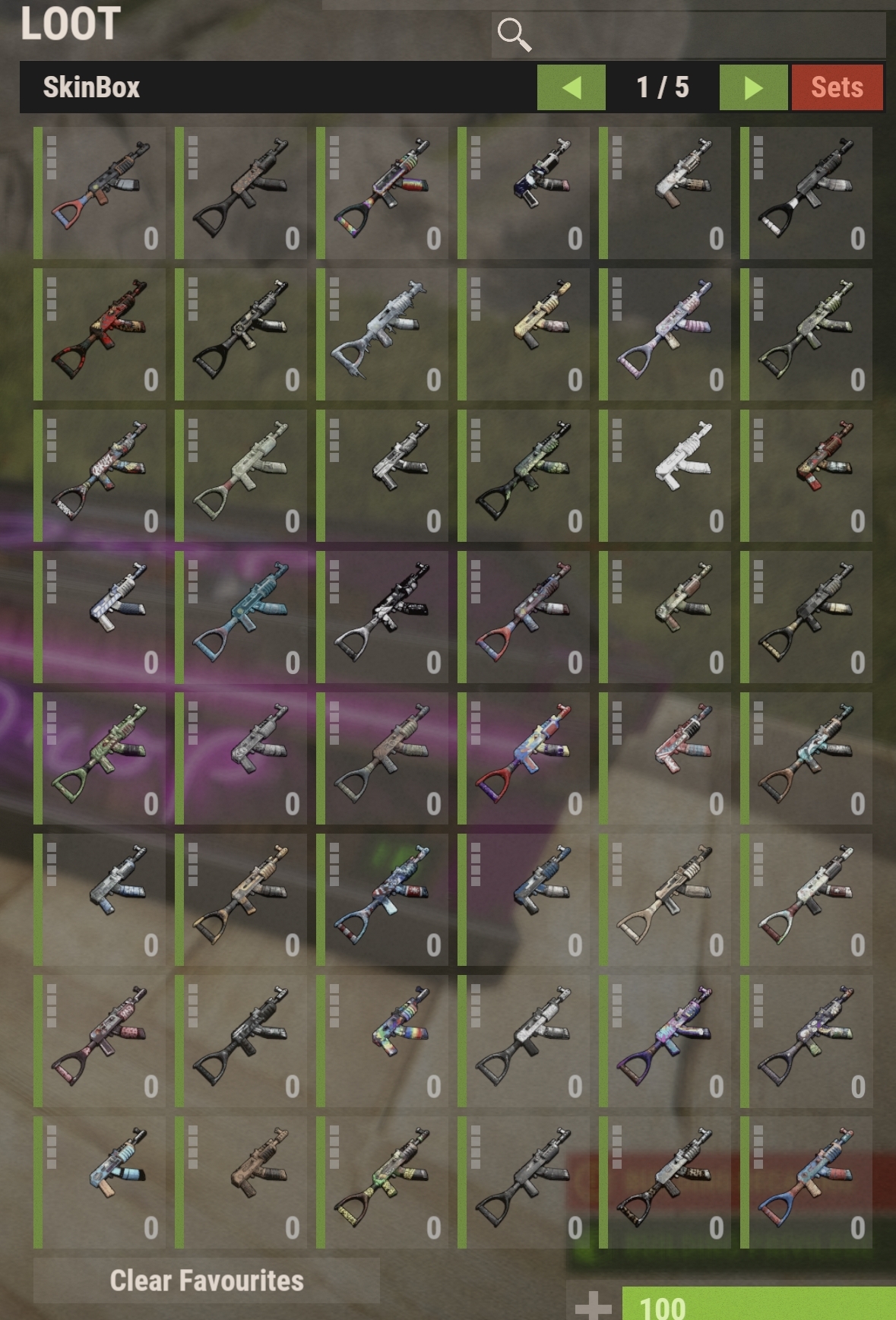
SkinBox allows players to change the skin of any skinnable item they place in the box.
When a item has been placed in the box it will be populated with the available skins.
The user can then drag out the skin they want.
Contents
Old video
UI changes in v2.2.0+
Features
SkinBox allows you to;
You can obtain your Steam API key by following this link -> https://steamcommunity.com/dev/apikey
Once you have your Steam API key enter it into your config as depicted below
"Steam API key for workshop skins (https://steamcommunity.com/dev/apikey)": "XXXXXXXXXXXXXXXXXXXXXXXXXXXX"
** Note ** This plugin will not function without a valid Steam API key!
Regarding client skin downloads
Neither the server or the plugin are responsible for actually loading skins on the client. This is purely between the client and Steam. The plugin merely tells the client the skin ID and the client asks Steam to download it.
Any issues regarding skin icons not loading on the client are entirely client side.
If users are having issues with skin icons not loading, tell them to open Steam, go to the downloads tabs, and force start the queued up workshop requests
Permissions
SkinBox uses Oxides permission system
To assign a user permission use oxide.grant user "username|steam id" "permission" in console.
To assign a group permission use oxide.grant group "groupname" "permission" in console.
You can read more about how to use the permission system here : uMod - Permissions
The permissions are all in the config and can be customized to your liking.
By default they are;
"skinbox.use" - Required to open the SkinBox
"skinbox.admin" - Required to use the admin commands
"skinbox.ignorecost" - Ignores usage cost for players with this permission
"skinbox.ignorecooldown" - Ignores cooldowns for players with this permission
Allowing re-skinning by item category
You can assign permissions to the various item categories that restrict skinning those items to players with the permission.
By default these all use the "skinbox.use" permission which allows anyone with that permission to skin those item types.
If you want to restrict these item types to specific players you need to change the permission to something other than the default and give it to those players
"Permission required to skin weapons": "skinbox.use",<br> "Permission required to skin deployables": "skinbox.use",<br> "Permission required to skin attire": "skinbox.use",
Restricting approved skins to specific players
You can restrict the usage of Rust approved skins to specific players the same way
"Permission required to view approved skins": "skinbox.use",
Custom permissions per skin
You can also assign custom permissions per skin ID in the "Custom permissions per skin" section of the config. You specify your permission and then add skins to that list.
The default config contains examples of how this is done
<span>"Custom permissions per skin"</span><span>:</span> <span>{</span><br> <span>"skinbox.example1"</span><span>:</span> <span>[</span><br> <span>9990</span><span>,</span><br> <span>9991</span><span>,</span><br> <span>9992</span><br> <span>]</span><span>,</span><br> <span>"skinbox.example2"</span><span>:</span> <span>[</span><br> <span>9993</span><span>,</span><br> <span>9994</span><span>,</span><br> <span>9995</span><br> <span>]</span><span>,</span><br> <span>"skinbox.example3"</span><span>:</span> <span>[</span><br> <span>9996</span><span>,</span><br> <span>9997</span><span>,</span><br> <span>9998</span><br> <span>]</span><br> <span>}</span>
Chat Commands
/skinbox | /sb - Opens the skin box
/skinbox <skinID> | /sb <skinID> - Apply the specified skin to the item currently in your hands without opening the box
This command and aliases of this command can be changed in the config in the section titled "Commands to open the SkinBox"
/skindeployed | /sd - Opens the skin box to reskin deployed items
/skindeployed <skinID> | /sd <skinID> - Apply the specified skin to the target entity without opening the box
This command and aliases of this command can be changed in the config in the section titled "Commands to open the deployed item SkinBox"
/skinset | /ss - Opens the skin set box
/skinset <ID> | /ss <ID> - Apply the skin set with the specified ID to your inventory without opening the box
This command and aliases of this command can be changed in the config in the section titled "Commands to open the skin set"
/skinrequest <skinID> | /sr <skinID> - Allows players to request a skin by ID
Console Commands
Adding/removing individual skin IDs
skinbox.addskin - Adds one or more skins using their individual ID numbers
(Ex. skinbox.addskin 820574348 (one only) -OR- skinbox.addskin 820574348 820610731 (two at once, you can add up to 16 skin IDs in the same command))
skinbox.removeskin
(Ex. skinbox.removeskin 820574348 (one only) -OR- skinbox.removeskin 820574348 820610731 (two at once, you can add up to 16 skin IDs in the same command))
skinbox.addvipskin <permission> <skinID> - Adds the skin(s) using their individual ID numbers and assigns it the specified permission.
This permission must already exist in the custom permission section of the config
skinbox.removevipskin <permission> <skinID> - Removes the skin and removes it from that permissions skin list.
This permission must already exist in the custom permission section of the config
skinbox.validatevipskins - Compares the VIP skin lists with the actual skin list and queries any missing skins from the workshop.
skinbox.request <userID> <skinID> - A variant of the /skinrequest command run via console intended for use as a API call from another plugin. If this command is run by a player it will be forwarded to the chat variant.
Adding/removing skin collections
skinbox.addcollection - Adds all the skins in the collection
(Ex: skinbox.addcollection 659627304)
skinbox.removecollection - Removes all the skins in the collection
(Ex: skinbox.addcollection 659627304)
skinbox.addvipcollection <permission> <collectionID> - Adds all the skins in the collection and assigns them the specified permission.
This permission must already exist in the custom permission section of the config
skinbox.removecollection - Removes all the skins in the collection and removes them from that permissions skin list.
This permission must already exist in the custom permission section of the config
Blacklisting skin IDs
skinbox.addexcluded - Prevent players from using this skin unless they have the appropriate auth level
(Ex: skinbox.addexcluded 820574348 (one only) -OR- skinbox.addexcluded 820574348 820610731)
skinbox.removeexcluded - Remove a skin ID from the excluded list
(Ex: skinbox.removeskin 820574348 -OR- skinbox.removeskin 820574348 820610731)
skinbox.addcollectionexclusion - Add an entire skin collection to the skin blacklist
skinbox.removecollectionexclusion - Remove an entire skin collection from the skin blacklist
How to find these skin and collection ID numbers
Open the Steam Workshop by your preferred browser and click on any skin.
In the URL you will see a ID number tacked on the end. This is the skin ID that you will need to use to add this skin.
Use the same process for adding skin collections
Example, the end of the URL contains ?id=2373483517. This number is the skin ID
Applying usage costs to the SkinBox
You can specify costs to use the SkinBox and reskin items in the config section titled "Usage Cost Options"
In here you can change the costs, and which currency to use when applying costs.
If you want VIP's to incur no charge for using the SkinBox, simply grant them the permission "skinbox.ignorecost"
<span>"Usage Cost Options"</span><span>:</span> <span>{</span><br> <span>"Enable usage costs"</span><span>:</span> <span>false</span><span>,</span><br> <span>"Currency used for usage costs (Scrap, Economics, ServerRewards)"</span><span>:</span> <span>"Scrap"</span><span>,</span><br> <span>"Cost to open the SkinBox"</span><span>:</span> <span>5</span><span>,</span><br> <span>"Cost to skin deployables"</span><span>:</span> <span>10</span><span>,</span><br> <span>"Cost to skin attire"</span><span>:</span> <span>20</span><span>,</span><br> <span>"Cost to skin weapons"</span><span>:</span> <span>30</span><br> <span>}</span><span>,</span>
Applying cooldowns after using the SkinBox
You can apply cooldown periods to players after using the SkinBox. You can modify the settings for this in the config section titled "Cooldown Options"
If you want prevent cooldowns from being applied to VIP's simply grant them the permission "skinbox.ignorecooldown"
<span>"Cooldown Options"</span><span>:</span> <span>{</span><br> <span>"Enable cooldowns"</span><span>:</span> <span>false</span><span>,</span><br> <span>"Cooldown time start's when a item is removed from the box"</span><span>:</span> <span>true</span><span>,</span><br> <span>"Length of cooldown time (seconds)"</span><span>:</span> <span>60</span><br> <span>}</span><span>,</span>
Favourites System
The favourites system works by recording which skins a player uses and prioritizes those that are used the most.
It also incorporates a data purge system to remove old player data
This system can be toggled in the config, and the purge time can be adjusted
Players can also clear their favourites for each item using the provided button
Skin Set System
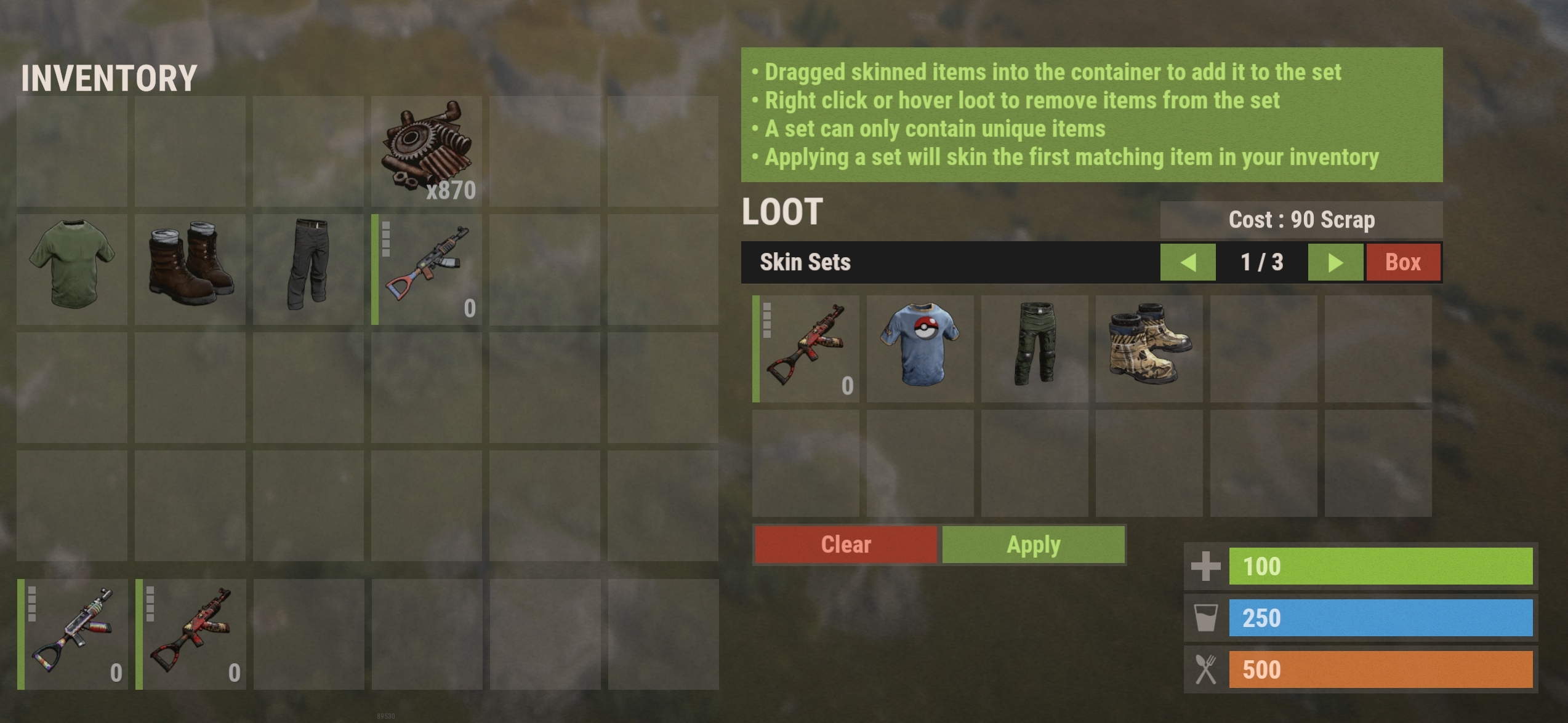
The skin set system allows players with permission to store specific skins in a set and easily apply it to their inventory
Players can access the skin set box by pressing the "Set" button in the skin box, or by typing one of the skin set chat commands
The player will have 12 slots which they can drag skinned items in to. The skin set box will save these skins for the player.
- Skins will be applied to non-skinned items in the inventory first, before overriding items that are already skinned
- The skin will only apply to the first item of the same type found in the inventory
- You can only have unique items in the skin set (so 1 assault rifle, 1 pair of pants, etc)
- To add a item to the skin set you just drag a skinned item in to the skin set box
- To remove a item from the skin set, right click the item or hover loot over it
- You can clear an entire set by pressing the 'Clear' button
- You can apply a skin set by pressing the 'Apply' button
- You can edit the number of skin sets a player can have in the config file
- Skin sets use cost rules set up in the config. The cost to apply shown in the skin set UI reflects the cost to apply that set to the users current inventory
Skin Request System
The skin request system allows players to request skins by skin ID which are then posted to Discord via webhook for server owners to consider. This does not automatically add the skin to skin box.
Users can use the command /skinrequest or /sr followed by up to 10 skin IDs to request skins, provided they have the permission you have set in the config.
This feature is disabled by default as you must enter a Discord webhook URL in the config for the plugin to post to.
There is also a console command "skinbox.request <userID> <skinID>" which can be used by other plugins for the same purpose
Spray Can Support
You can optionally provides players with specially skinned spraycans that can be used to reskin both items that are on the floor, and deployed items such as doors and boxes.
This option is disabled by default, to enable it set "Allow skinning via SkinBox spray can" to true in the config.
This option has a console command that can be used to give/create SkinBox spray cans.
The command can only be run by players with the admin permission, via RCON, or it can be added to a store that supports purchasing commands.
Running the command "skinbox.spraycan" with no arguments via the ingame console will give yourself a spray can
Running the command "skinbox.spraycan <playerNameOrID>" in RCON or via a ingame store will give the target player a spray can
If you want to include these items in your loot table the shortname is 'spraycan' and the skin ID is '2937962221'
Other config options
"Maximum number of pages viewable" - Sets the limit of pages a user can access in the SkinBox
"Include approved skins" - Automatically import all approved skins
"Include manually imported workshop skins" - Imports all workshop skins you have added via command, or directly in to the config
"Remove approved skin ID's from config workshop skin list" - Removes any approved skin ID's from the workshop list in the config when the plugin loads
"Include redirected skins" - Allows usage of redirected skins such as industrial door -> sheet metal door
"Auth-level required to view blacklisted skins" - Players with this auth-level will be able to view blacklisted skins
Config
The configuration file can be found in your server directory at .../oxide/config/SkinBox.json
The use of an editor and validator is recommended to avoid formatting issues
<span>{</span><br> <span>"Skin Options"</span><span>:</span> <span>{</span><br> <span>"Maximum number of approved skins allowed for each item (-1 is unlimited)"</span><span>:</span> <span>-1</span><span>,</span><br> <span>"Maximum number of pages viewable"</span><span>:</span> <span>3</span><span>,</span><br> <span>"Include approved skins"</span><span>:</span> <span>true</span><span>,</span><br> <span>"Include manually imported workshop skins"</span><span>:</span> <span>true</span><span>,</span><br> <span>"Remove approved skin ID's from config workshop skin list"</span><span>:</span> <span>false</span><span>,</span><br> <span>"Include redirected skins"</span><span>:</span> <span>true</span><span>,</span><br> <span>"Steam API key for workshop skins (https://steamcommunity.com/dev/apikey)"</span><span>:</span> <span>""</span><br> <span>}</span><span>,</span><br> <span>"Cooldown Options"</span><span>:</span> <span>{</span><br> <span>"Enable cooldowns"</span><span>:</span> <span>false</span><span>,</span><br> <span>"Cooldown time start's when a item is removed from the box"</span><span>:</span> <span>true</span><span>,</span><br> <span>"Length of cooldown time (seconds)"</span><span>:</span> <span>60</span><br> <span>}</span><span>,</span><br> <span>"Command Options"</span><span>:</span> <span>{</span><br> <span>"Commands to open the SkinBox"</span><span>:</span> <span>[</span><br> <span>"skinbox"</span><span>,</span><br> <span>"sb"</span><br> <span>]</span><span>,</span><br> <span>"Commands to open the deployed item SkinBox"</span><span>:</span> <span>[</span><br> <span>"skindeployed"</span><span>,</span><br> <span>"sd"</span><br> <span>]</span><span>[</span>/FONT<span>]</span><span>,</span><br> <span>"Commands to open the set set box"</span><span>:</span> <span>[</span><br> <span>"skinset"</span><span>,</span><br> <span>"ss"</span><br> <span>]</span><span>,</span><br> <span>"Allow skinning via Skinbox spray can"</span><span>:</span> <span>true</span><br><span>[</span>FONT=Tahoma<span>]</span> <span>}</span><span>,</span><br> <span>"Permission Options"</span><span>:</span> <span>{</span><br> <span>"Permission required to use SkinBox"</span><span>:</span> <span>"skinbox.use"</span><span>,</span><br> <span>"Permission required to reskin deployed items"</span><span>:</span> <span>"skinbox.use"</span><span>,</span><br> <span>"Permission required to use admin functions"</span><span>:</span> <span>"skinbox.admin"</span><span>,</span><br> <span>"Permission that bypasses usage costs"</span><span>:</span> <span>"skinbox.ignorecost"</span><span>,</span><br> <span>"Permission that bypasses usage cooldown"</span><span>:</span> <span>"skinbox.ignorecooldown"</span><span>,</span><br> <span>"Permission required to skin weapons"</span><span>:</span> <span>"skinbox.use"</span><span>,</span><br> <span>"Permission required to skin deployables"</span><span>:</span> <span>"skinbox.use"</span><span>,</span><br> <span>"Permission required to skin attire"</span><span>:</span> <span>"skinbox.use"</span><span>,</span><br> <span>"Permission required to view approved skins"</span><span>:</span> <span>"skinbox.use"</span><span>,</span><span>[</span>/FONT<span>]</span><br> <span>"Permission required to use skin sets"</span><span>:</span> <span>"skinbox.use"</span><span>,</span><br><span>[</span>FONT=Tahoma<span>]</span> <span>"Custom permissions per skin"</span><span>:</span> <span>{</span><br> <span>"skinbox.example1"</span><span>:</span> <span>[</span><br> <span>9990</span><span>,</span><br> <span>9991</span><span>,</span><br> <span>9992</span><br> <span>]</span><span>,</span><br> <span>"skinbox.example2"</span><span>:</span> <span>[</span><br> <span>9993</span><span>,</span><br> <span>9994</span><span>,</span><br> <span>9995</span><br> <span>]</span><span>,</span><br> <span>"skinbox.example3"</span><span>:</span> <span>[</span><br> <span>9996</span><span>,</span><br> <span>9997</span><span>,</span><br> <span>9998</span><br> <span>]</span><br> <span>}</span><br> <span>}</span><span>,</span><br> <span>"Usage Cost Options"</span><span>:</span> <span>{</span><br> <span>"Enable usage costs"</span><span>:</span> <span>false</span><span>,</span><br> <span>"Currency used for usage costs (Scrap, Economics, ServerRewards)"</span><span>:</span> <span>"Scrap"</span><span>,</span><br> <span>"Cost to open the SkinBox"</span><span>:</span> <span>5</span><span>,</span><br> <span>"Cost to skin deployables"</span><span>:</span> <span>10</span><span>,</span><br> <span>"Cost to skin attire"</span><span>:</span> <span>20</span><span>,</span><br> <span>"Cost to skin weapons"</span><span>:</span> <span>30</span><br> <span>}</span><span>,</span><br> <span>"Other Options"</span><span>:</span> <span>{</span><br> <span>"Allow stacked items"</span><span>:</span> <span>false</span><span>,</span><br> <span>"Auth-level required to view blacklisted skins"</span><span>:</span> <span>2</span><br> <span>}</span><span>[</span>/FONT<span>]</span><span>,</span><br> <span>"Favourites Options"</span><span>:</span> <span>{</span><br> <span>"Enable favourites system"</span><span>:</span> <span>true</span><span>,</span><br> <span>"Enable purging of favourites data"</span><span>:</span> <span>true</span><span>,</span><br> <span>"Purge user favourites that haven't been online for x amount of days"</span><span>:</span> <span>7</span><br> <span>}</span><span>,</span><br> <span>"Set Options"</span><span>:</span> <span>{</span><br> <span>"Enable set system"</span><span>:</span> <span>true</span><span>,</span><br> <span>"Number of skin sets allowed"</span><span>:</span> <span>3</span><br> <span>}</span><span>,</span><br><span>[</span>FONT=Tahoma<span>]</span> <span>"Imported Workshop Skins"</span><span>:</span> <span>{</span><span>}</span><span>,</span><br> <span>"Blacklisted Skin ID's"</span><span>:</span> <span>[</span><span>]</span><span>,</span><br> <span>"Version"</span><span>:</span> <span>{</span><br> <span>"Major"</span><span>:</span> <span>2</span><span>,</span><br> <span>"Minor"</span><span>:</span> <span>2</span><span>,</span><br> <span>"Patch"</span><span>:</span> <span>0</span><br> <span>}</span><br><span>}</span>
Hooks
Return a reason in a string to cancel any of the following hooks
<span>string</span> <span>SB_CanUseSkinBox</span><span>(</span><span>BasePlayer</span> player<span>)</span><br><span>string</span> <span>SB_CanAcceptItem</span><span>(</span><span>BasePlayer</span> player<span>,</span> <span>Item</span> item<span>)</span><br><span>string</span> <span>SB_CanReskinItem</span><span>(</span><span>BasePlayer</span> player<span>,</span> <span>Item</span> item<span>,</span> <span>ulong</span> newSkinID<span>)</span><br><span>string</span> <span>SB_CanReskinDeployable</span><span>(</span><span>BasePlayer</span> player<span>,</span> <span>BaseEntity</span> targetEntity<span>,</span> <span>ItemDefinition</span> targetItemDefintion<span>)</span><br><span>string</span> <span>SB_CanReskinDeployableWith</span><span>(</span><span>BasePlayer</span> player<span>,</span> <span>BaseEntity</span> targetEntity<span>,</span> <span>ItemDefinition</span> targetItemDefintion<span>,</span> <span>ulong</span> newSkinID<span>)</span>
Return a List<ulong> of skin ID's for the specified item shortname to override what is shown in the SkinBox. Return null for default behaviour
List<span><</span><span>ulong</span><span>></span> <span>SB_GetSkinOverrides</span><span>(</span><span>BasePlayer</span> player<span>,</span> <span>string</span> shortname<span>)</span><br><br><span>//Example usage</span><br><span>private</span> <span>object</span> <span>SB_GetSkinOverrides</span><span>(</span><span>BasePlayer</span> player<span>,</span> <span>string</span> shortname<span>)</span><br><span>{</span><br> <span>if</span> <span>(</span>shortname <span>==</span> <span>"tshirt"</span><span>)</span><br> <span>{</span><br> Debug<span>.</span><span>Log</span><span>(</span>$<span>"Overriding skins for {player.displayName}"</span><span>)</span><span>;</span><br> <span>return</span> <span>new</span> <span>List</span><span><</span><span>ulong</span><span>></span><br> <span>{</span><br> <span>2828965156</span><span>,</span><br> <span>2828949212</span><span>,</span><br> <span>2828923429</span><span>,</span><br> <span>2828843252</span><span>,</span><br> <span>2828375164</span><span>,</span><br> <span>2828348837</span><span>,</span><br> <span>2827794893</span><br> <span>}</span><span>;</span><br> <span>}</span><br> <span>return</span> <span>null</span><span>;</span><br><span>}</span>
https://umod.org/plugins/player-dlc-api
This plugin require the Chaos extension -> https://chaoscode.io/resources/chaos.321/
⚠ To make use of the automated skin filtering you will need the Player DLC API plugin
https://umod.org/plugins/player-dlc-api
⚠ Facepunch have changed their TOS regarding DLC/paid content ⚠
As of August 7th 2025, it is not allowed to grant users access to paid DLC that they do not own.
That includes all Rust DLC and any paid skins.
If you continue to grant users access after that date it can result in your server being delisted or worse.
You can still use SkinBox, by using the Player DLC API plugin, it filters the skins to what the player is allowed to use
Spoiler: Rust TOS regarding DLC content

Community Server and Hosting Guidelines — facepunch

What can I do with DLC on my Server?
(a) Can I restrict access to DLC content on our Servers? No - if it is Facepunch approved downloadable content ("Facepunch DLC"), then players must be able to freely and unconditionally access their validly purchased Facepunch DLC across all Servers.
"Facepunch DLC" includes but is not limited to: (i) paid content packs (e.g. building skins, decor packs, hazmat skins, instruments); and (ii) approved in-game purchases (e.g. Facepunch approved Steam Marketplace skins, items or cosmetics).
(b) What about downloadable content which isn't Facepunch DLC? Yes - you can restrict access to downloadable content which isn't Facepunch DLC on your Servers. This includes any custom or Steam Workshop content which is not officially sold or gated by Facepunch.
(c) Can I grant use of Facepunch DLC to users if they don't own it? No - you must not grant access to any Facepunch DLC to players who have not validly purchased it. Servers may not bypass ownership checks or artificially enable Facepunch DLC.
(b) Are there any exceptions to this? The only exception to the above is in relation to Servers that are set up for testing of game mechanics ("Test Servers"). Test Servers may temporarily restrict or grant Facepunch DLC access for testing purposes only.
Additionally:
What happens if my Server does not abide by these guidelines?
Failure to comply with these guidelines may result in delisting from the server browser or other sanctions (for example, serious or repeated breach of these guidelines may result in a game ban) and may also be considered a breach of the Facepunch Terms of Service.
SkinBox allows players to change the skin of any skinnable item they place in the box.
When a item has been placed in the box it will be populated with the available skins.
The user can then drag out the skin they want.
Contents
- • Features
- • This plugin requires a Steam API key to access workshop skin lists.
- • Regarding client skin downloads
- • Permissions
- • Allowing re-skinning by item category
- • Restricting approved skins to specific players
- • Custom permissions per skin
- • Chat Commands
- • Console Commands
- • Adding/removing individual skin IDs
- • Adding/removing skin collections
- • Blacklisting skin IDs
- • How to find these skin and collection ID numbers
- • Applying usage costs to the SkinBox
- • Applying cooldowns after using the SkinBox
- • Favourites System
- • Skin Set System
- • Skin Request System
- • Spray Can Support
- • Other config options
- • Config
- • Hooks
Old video
UI changes in v2.2.0+
Features
SkinBox allows you to;
- Import specific skins from the Steam Workshop that players can claim in the SkinBox
- Easily import entire skin collections from the Steam Workshop
- Supports redirected item skins such as the industrial door -> sheet metal door
- Ability to reskin deployed items
- Applies workshop skin names to items
- Apply usage costs to use the SkinBox
- Apply usage cooldowns to use the SkinBox
- Give VIP's access to specific skins
- Search for skins by name in the container
- Use a favourite system to prioritize commonly used skins
- Option to use to specially skinned spray cans instead of command
- Ability to store sets of skinned items and apply them to your inventory
You can obtain your Steam API key by following this link -> https://steamcommunity.com/dev/apikey
Once you have your Steam API key enter it into your config as depicted below
"Steam API key for workshop skins (https://steamcommunity.com/dev/apikey)": "XXXXXXXXXXXXXXXXXXXXXXXXXXXX"
** Note ** This plugin will not function without a valid Steam API key!
Regarding client skin downloads
Neither the server or the plugin are responsible for actually loading skins on the client. This is purely between the client and Steam. The plugin merely tells the client the skin ID and the client asks Steam to download it.
Any issues regarding skin icons not loading on the client are entirely client side.
If users are having issues with skin icons not loading, tell them to open Steam, go to the downloads tabs, and force start the queued up workshop requests
Permissions
SkinBox uses Oxides permission system
To assign a user permission use oxide.grant user "username|steam id" "permission" in console.
To assign a group permission use oxide.grant group "groupname" "permission" in console.
You can read more about how to use the permission system here : uMod - Permissions
The permissions are all in the config and can be customized to your liking.
By default they are;
"skinbox.use" - Required to open the SkinBox
"skinbox.admin" - Required to use the admin commands
"skinbox.ignorecost" - Ignores usage cost for players with this permission
"skinbox.ignorecooldown" - Ignores cooldowns for players with this permission
Allowing re-skinning by item category
You can assign permissions to the various item categories that restrict skinning those items to players with the permission.
By default these all use the "skinbox.use" permission which allows anyone with that permission to skin those item types.
If you want to restrict these item types to specific players you need to change the permission to something other than the default and give it to those players
"Permission required to skin weapons": "skinbox.use",<br> "Permission required to skin deployables": "skinbox.use",<br> "Permission required to skin attire": "skinbox.use",
Restricting approved skins to specific players
You can restrict the usage of Rust approved skins to specific players the same way
"Permission required to view approved skins": "skinbox.use",
Custom permissions per skin
You can also assign custom permissions per skin ID in the "Custom permissions per skin" section of the config. You specify your permission and then add skins to that list.
The default config contains examples of how this is done
<span>"Custom permissions per skin"</span><span>:</span> <span>{</span><br> <span>"skinbox.example1"</span><span>:</span> <span>[</span><br> <span>9990</span><span>,</span><br> <span>9991</span><span>,</span><br> <span>9992</span><br> <span>]</span><span>,</span><br> <span>"skinbox.example2"</span><span>:</span> <span>[</span><br> <span>9993</span><span>,</span><br> <span>9994</span><span>,</span><br> <span>9995</span><br> <span>]</span><span>,</span><br> <span>"skinbox.example3"</span><span>:</span> <span>[</span><br> <span>9996</span><span>,</span><br> <span>9997</span><span>,</span><br> <span>9998</span><br> <span>]</span><br> <span>}</span>
Chat Commands
/skinbox | /sb - Opens the skin box
/skinbox <skinID> | /sb <skinID> - Apply the specified skin to the item currently in your hands without opening the box
This command and aliases of this command can be changed in the config in the section titled "Commands to open the SkinBox"
/skindeployed | /sd - Opens the skin box to reskin deployed items
/skindeployed <skinID> | /sd <skinID> - Apply the specified skin to the target entity without opening the box
This command and aliases of this command can be changed in the config in the section titled "Commands to open the deployed item SkinBox"
/skinset | /ss - Opens the skin set box
/skinset <ID> | /ss <ID> - Apply the skin set with the specified ID to your inventory without opening the box
This command and aliases of this command can be changed in the config in the section titled "Commands to open the skin set"
/skinrequest <skinID> | /sr <skinID> - Allows players to request a skin by ID
Console Commands
Adding/removing individual skin IDs
skinbox.addskin - Adds one or more skins using their individual ID numbers
(Ex. skinbox.addskin 820574348 (one only) -OR- skinbox.addskin 820574348 820610731 (two at once, you can add up to 16 skin IDs in the same command))
skinbox.removeskin
(Ex. skinbox.removeskin 820574348 (one only) -OR- skinbox.removeskin 820574348 820610731 (two at once, you can add up to 16 skin IDs in the same command))
skinbox.addvipskin <permission> <skinID> - Adds the skin(s) using their individual ID numbers and assigns it the specified permission.
This permission must already exist in the custom permission section of the config
skinbox.removevipskin <permission> <skinID> - Removes the skin and removes it from that permissions skin list.
This permission must already exist in the custom permission section of the config
skinbox.validatevipskins - Compares the VIP skin lists with the actual skin list and queries any missing skins from the workshop.
skinbox.request <userID> <skinID> - A variant of the /skinrequest command run via console intended for use as a API call from another plugin. If this command is run by a player it will be forwarded to the chat variant.
Adding/removing skin collections
skinbox.addcollection - Adds all the skins in the collection
(Ex: skinbox.addcollection 659627304)
skinbox.removecollection - Removes all the skins in the collection
(Ex: skinbox.addcollection 659627304)
skinbox.addvipcollection <permission> <collectionID> - Adds all the skins in the collection and assigns them the specified permission.
This permission must already exist in the custom permission section of the config
skinbox.removecollection - Removes all the skins in the collection and removes them from that permissions skin list.
This permission must already exist in the custom permission section of the config
Blacklisting skin IDs
skinbox.addexcluded - Prevent players from using this skin unless they have the appropriate auth level
(Ex: skinbox.addexcluded 820574348 (one only) -OR- skinbox.addexcluded 820574348 820610731)
skinbox.removeexcluded - Remove a skin ID from the excluded list
(Ex: skinbox.removeskin 820574348 -OR- skinbox.removeskin 820574348 820610731)
skinbox.addcollectionexclusion - Add an entire skin collection to the skin blacklist
skinbox.removecollectionexclusion - Remove an entire skin collection from the skin blacklist
How to find these skin and collection ID numbers
Open the Steam Workshop by your preferred browser and click on any skin.
In the URL you will see a ID number tacked on the end. This is the skin ID that you will need to use to add this skin.
Use the same process for adding skin collections
Example, the end of the URL contains ?id=2373483517. This number is the skin ID
Applying usage costs to the SkinBox
You can specify costs to use the SkinBox and reskin items in the config section titled "Usage Cost Options"
In here you can change the costs, and which currency to use when applying costs.
If you want VIP's to incur no charge for using the SkinBox, simply grant them the permission "skinbox.ignorecost"
<span>"Usage Cost Options"</span><span>:</span> <span>{</span><br> <span>"Enable usage costs"</span><span>:</span> <span>false</span><span>,</span><br> <span>"Currency used for usage costs (Scrap, Economics, ServerRewards)"</span><span>:</span> <span>"Scrap"</span><span>,</span><br> <span>"Cost to open the SkinBox"</span><span>:</span> <span>5</span><span>,</span><br> <span>"Cost to skin deployables"</span><span>:</span> <span>10</span><span>,</span><br> <span>"Cost to skin attire"</span><span>:</span> <span>20</span><span>,</span><br> <span>"Cost to skin weapons"</span><span>:</span> <span>30</span><br> <span>}</span><span>,</span>
Applying cooldowns after using the SkinBox
You can apply cooldown periods to players after using the SkinBox. You can modify the settings for this in the config section titled "Cooldown Options"
If you want prevent cooldowns from being applied to VIP's simply grant them the permission "skinbox.ignorecooldown"
<span>"Cooldown Options"</span><span>:</span> <span>{</span><br> <span>"Enable cooldowns"</span><span>:</span> <span>false</span><span>,</span><br> <span>"Cooldown time start's when a item is removed from the box"</span><span>:</span> <span>true</span><span>,</span><br> <span>"Length of cooldown time (seconds)"</span><span>:</span> <span>60</span><br> <span>}</span><span>,</span>
Favourites System
The favourites system works by recording which skins a player uses and prioritizes those that are used the most.
It also incorporates a data purge system to remove old player data
This system can be toggled in the config, and the purge time can be adjusted
Players can also clear their favourites for each item using the provided button
Skin Set System
The skin set system allows players with permission to store specific skins in a set and easily apply it to their inventory
Players can access the skin set box by pressing the "Set" button in the skin box, or by typing one of the skin set chat commands
The player will have 12 slots which they can drag skinned items in to. The skin set box will save these skins for the player.
- Skins will be applied to non-skinned items in the inventory first, before overriding items that are already skinned
- The skin will only apply to the first item of the same type found in the inventory
- You can only have unique items in the skin set (so 1 assault rifle, 1 pair of pants, etc)
- To add a item to the skin set you just drag a skinned item in to the skin set box
- To remove a item from the skin set, right click the item or hover loot over it
- You can clear an entire set by pressing the 'Clear' button
- You can apply a skin set by pressing the 'Apply' button
- You can edit the number of skin sets a player can have in the config file
- Skin sets use cost rules set up in the config. The cost to apply shown in the skin set UI reflects the cost to apply that set to the users current inventory
Skin Request System
The skin request system allows players to request skins by skin ID which are then posted to Discord via webhook for server owners to consider. This does not automatically add the skin to skin box.
Users can use the command /skinrequest or /sr followed by up to 10 skin IDs to request skins, provided they have the permission you have set in the config.
This feature is disabled by default as you must enter a Discord webhook URL in the config for the plugin to post to.
There is also a console command "skinbox.request <userID> <skinID>" which can be used by other plugins for the same purpose
Spray Can Support
You can optionally provides players with specially skinned spraycans that can be used to reskin both items that are on the floor, and deployed items such as doors and boxes.
This option is disabled by default, to enable it set "Allow skinning via SkinBox spray can" to true in the config.
This option has a console command that can be used to give/create SkinBox spray cans.
The command can only be run by players with the admin permission, via RCON, or it can be added to a store that supports purchasing commands.
Running the command "skinbox.spraycan" with no arguments via the ingame console will give yourself a spray can
Running the command "skinbox.spraycan <playerNameOrID>" in RCON or via a ingame store will give the target player a spray can
If you want to include these items in your loot table the shortname is 'spraycan' and the skin ID is '2937962221'
Other config options
"Maximum number of pages viewable" - Sets the limit of pages a user can access in the SkinBox
"Include approved skins" - Automatically import all approved skins
"Include manually imported workshop skins" - Imports all workshop skins you have added via command, or directly in to the config
"Remove approved skin ID's from config workshop skin list" - Removes any approved skin ID's from the workshop list in the config when the plugin loads
"Include redirected skins" - Allows usage of redirected skins such as industrial door -> sheet metal door
"Auth-level required to view blacklisted skins" - Players with this auth-level will be able to view blacklisted skins
Config
The configuration file can be found in your server directory at .../oxide/config/SkinBox.json
The use of an editor and validator is recommended to avoid formatting issues
<span>{</span><br> <span>"Skin Options"</span><span>:</span> <span>{</span><br> <span>"Maximum number of approved skins allowed for each item (-1 is unlimited)"</span><span>:</span> <span>-1</span><span>,</span><br> <span>"Maximum number of pages viewable"</span><span>:</span> <span>3</span><span>,</span><br> <span>"Include approved skins"</span><span>:</span> <span>true</span><span>,</span><br> <span>"Include manually imported workshop skins"</span><span>:</span> <span>true</span><span>,</span><br> <span>"Remove approved skin ID's from config workshop skin list"</span><span>:</span> <span>false</span><span>,</span><br> <span>"Include redirected skins"</span><span>:</span> <span>true</span><span>,</span><br> <span>"Steam API key for workshop skins (https://steamcommunity.com/dev/apikey)"</span><span>:</span> <span>""</span><br> <span>}</span><span>,</span><br> <span>"Cooldown Options"</span><span>:</span> <span>{</span><br> <span>"Enable cooldowns"</span><span>:</span> <span>false</span><span>,</span><br> <span>"Cooldown time start's when a item is removed from the box"</span><span>:</span> <span>true</span><span>,</span><br> <span>"Length of cooldown time (seconds)"</span><span>:</span> <span>60</span><br> <span>}</span><span>,</span><br> <span>"Command Options"</span><span>:</span> <span>{</span><br> <span>"Commands to open the SkinBox"</span><span>:</span> <span>[</span><br> <span>"skinbox"</span><span>,</span><br> <span>"sb"</span><br> <span>]</span><span>,</span><br> <span>"Commands to open the deployed item SkinBox"</span><span>:</span> <span>[</span><br> <span>"skindeployed"</span><span>,</span><br> <span>"sd"</span><br> <span>]</span><span>[</span>/FONT<span>]</span><span>,</span><br> <span>"Commands to open the set set box"</span><span>:</span> <span>[</span><br> <span>"skinset"</span><span>,</span><br> <span>"ss"</span><br> <span>]</span><span>,</span><br> <span>"Allow skinning via Skinbox spray can"</span><span>:</span> <span>true</span><br><span>[</span>FONT=Tahoma<span>]</span> <span>}</span><span>,</span><br> <span>"Permission Options"</span><span>:</span> <span>{</span><br> <span>"Permission required to use SkinBox"</span><span>:</span> <span>"skinbox.use"</span><span>,</span><br> <span>"Permission required to reskin deployed items"</span><span>:</span> <span>"skinbox.use"</span><span>,</span><br> <span>"Permission required to use admin functions"</span><span>:</span> <span>"skinbox.admin"</span><span>,</span><br> <span>"Permission that bypasses usage costs"</span><span>:</span> <span>"skinbox.ignorecost"</span><span>,</span><br> <span>"Permission that bypasses usage cooldown"</span><span>:</span> <span>"skinbox.ignorecooldown"</span><span>,</span><br> <span>"Permission required to skin weapons"</span><span>:</span> <span>"skinbox.use"</span><span>,</span><br> <span>"Permission required to skin deployables"</span><span>:</span> <span>"skinbox.use"</span><span>,</span><br> <span>"Permission required to skin attire"</span><span>:</span> <span>"skinbox.use"</span><span>,</span><br> <span>"Permission required to view approved skins"</span><span>:</span> <span>"skinbox.use"</span><span>,</span><span>[</span>/FONT<span>]</span><br> <span>"Permission required to use skin sets"</span><span>:</span> <span>"skinbox.use"</span><span>,</span><br><span>[</span>FONT=Tahoma<span>]</span> <span>"Custom permissions per skin"</span><span>:</span> <span>{</span><br> <span>"skinbox.example1"</span><span>:</span> <span>[</span><br> <span>9990</span><span>,</span><br> <span>9991</span><span>,</span><br> <span>9992</span><br> <span>]</span><span>,</span><br> <span>"skinbox.example2"</span><span>:</span> <span>[</span><br> <span>9993</span><span>,</span><br> <span>9994</span><span>,</span><br> <span>9995</span><br> <span>]</span><span>,</span><br> <span>"skinbox.example3"</span><span>:</span> <span>[</span><br> <span>9996</span><span>,</span><br> <span>9997</span><span>,</span><br> <span>9998</span><br> <span>]</span><br> <span>}</span><br> <span>}</span><span>,</span><br> <span>"Usage Cost Options"</span><span>:</span> <span>{</span><br> <span>"Enable usage costs"</span><span>:</span> <span>false</span><span>,</span><br> <span>"Currency used for usage costs (Scrap, Economics, ServerRewards)"</span><span>:</span> <span>"Scrap"</span><span>,</span><br> <span>"Cost to open the SkinBox"</span><span>:</span> <span>5</span><span>,</span><br> <span>"Cost to skin deployables"</span><span>:</span> <span>10</span><span>,</span><br> <span>"Cost to skin attire"</span><span>:</span> <span>20</span><span>,</span><br> <span>"Cost to skin weapons"</span><span>:</span> <span>30</span><br> <span>}</span><span>,</span><br> <span>"Other Options"</span><span>:</span> <span>{</span><br> <span>"Allow stacked items"</span><span>:</span> <span>false</span><span>,</span><br> <span>"Auth-level required to view blacklisted skins"</span><span>:</span> <span>2</span><br> <span>}</span><span>[</span>/FONT<span>]</span><span>,</span><br> <span>"Favourites Options"</span><span>:</span> <span>{</span><br> <span>"Enable favourites system"</span><span>:</span> <span>true</span><span>,</span><br> <span>"Enable purging of favourites data"</span><span>:</span> <span>true</span><span>,</span><br> <span>"Purge user favourites that haven't been online for x amount of days"</span><span>:</span> <span>7</span><br> <span>}</span><span>,</span><br> <span>"Set Options"</span><span>:</span> <span>{</span><br> <span>"Enable set system"</span><span>:</span> <span>true</span><span>,</span><br> <span>"Number of skin sets allowed"</span><span>:</span> <span>3</span><br> <span>}</span><span>,</span><br><span>[</span>FONT=Tahoma<span>]</span> <span>"Imported Workshop Skins"</span><span>:</span> <span>{</span><span>}</span><span>,</span><br> <span>"Blacklisted Skin ID's"</span><span>:</span> <span>[</span><span>]</span><span>,</span><br> <span>"Version"</span><span>:</span> <span>{</span><br> <span>"Major"</span><span>:</span> <span>2</span><span>,</span><br> <span>"Minor"</span><span>:</span> <span>2</span><span>,</span><br> <span>"Patch"</span><span>:</span> <span>0</span><br> <span>}</span><br><span>}</span>
Hooks
Return a reason in a string to cancel any of the following hooks
<span>string</span> <span>SB_CanUseSkinBox</span><span>(</span><span>BasePlayer</span> player<span>)</span><br><span>string</span> <span>SB_CanAcceptItem</span><span>(</span><span>BasePlayer</span> player<span>,</span> <span>Item</span> item<span>)</span><br><span>string</span> <span>SB_CanReskinItem</span><span>(</span><span>BasePlayer</span> player<span>,</span> <span>Item</span> item<span>,</span> <span>ulong</span> newSkinID<span>)</span><br><span>string</span> <span>SB_CanReskinDeployable</span><span>(</span><span>BasePlayer</span> player<span>,</span> <span>BaseEntity</span> targetEntity<span>,</span> <span>ItemDefinition</span> targetItemDefintion<span>)</span><br><span>string</span> <span>SB_CanReskinDeployableWith</span><span>(</span><span>BasePlayer</span> player<span>,</span> <span>BaseEntity</span> targetEntity<span>,</span> <span>ItemDefinition</span> targetItemDefintion<span>,</span> <span>ulong</span> newSkinID<span>)</span>
Return a List<ulong> of skin ID's for the specified item shortname to override what is shown in the SkinBox. Return null for default behaviour
List<span><</span><span>ulong</span><span>></span> <span>SB_GetSkinOverrides</span><span>(</span><span>BasePlayer</span> player<span>,</span> <span>string</span> shortname<span>)</span><br><br><span>//Example usage</span><br><span>private</span> <span>object</span> <span>SB_GetSkinOverrides</span><span>(</span><span>BasePlayer</span> player<span>,</span> <span>string</span> shortname<span>)</span><br><span>{</span><br> <span>if</span> <span>(</span>shortname <span>==</span> <span>"tshirt"</span><span>)</span><br> <span>{</span><br> Debug<span>.</span><span>Log</span><span>(</span>$<span>"Overriding skins for {player.displayName}"</span><span>)</span><span>;</span><br> <span>return</span> <span>new</span> <span>List</span><span><</span><span>ulong</span><span>></span><br> <span>{</span><br> <span>2828965156</span><span>,</span><br> <span>2828949212</span><span>,</span><br> <span>2828923429</span><span>,</span><br> <span>2828843252</span><span>,</span><br> <span>2828375164</span><span>,</span><br> <span>2828348837</span><span>,</span><br> <span>2827794893</span><br> <span>}</span><span>;</span><br> <span>}</span><br> <span>return</span> <span>null</span><span>;</span><br><span>}</span>


