


 584
584
BUG REPORT — Missing id/name Attributes on Pagination Input Fields
Severity: Medium | Category: HTML Standards / Accessibility / UX | Reported: March 2026
Severity: Medium | Category: HTML Standards / Accessibility / UX | Reported: March 2026
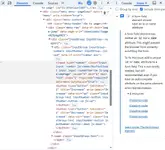
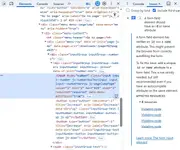
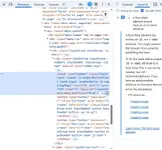
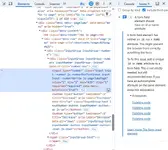
Proof — Chrome DevTools Screenshots
Screenshots below are from Chrome DevTools → Issues tab, captured on nulledvault.com/downloads/
Summary
All pagination "Go to page" input fields across the forum are missing required id and name attributes on their <input> elements. Chrome DevTools Issues panel reports 4 violations of this standard on every paginated page.
Environment
| Field | Details |
|---|---|
| Platform | NulledVault.com |
| Engine | XenForo |
| Browser | Google Chrome (latest) |
| Pages affected | All paginated pages — Downloads, Forums, Latest Reviews, Latest Questions |
| Violations | 4 per page |
| Detection tool | Chrome DevTools → Issues tab |
Steps to Reproduce
- Open any paginated page e.g. nulledvault.com/downloads/
- Press F12 to open Chrome DevTools
- Click the Issues tab (next to Console)
- Expand "A form field element should have an id or name attribute"
- 4 Violating nodes are listed — all are the <input type="number"> inside the page jump widget
Current Broken Code
This is what the input currently looks like in the DOM:
Code:
<input
  type="number"
  class="input input--number js-numberBoxTextInput input--numberNarrow js-pageJumpPage"
  value="4"
  min="1"
  max="419"
  step="1"
  required="required"
  data-menu-autofocus="true">
Problem: No id attribute. No name attribute. This violates the HTML5 specification for form elements.
Expected Correct Code
Code:
<input
  type="number"
  id="pageJump-{unique_id}"
  name="pageJump"
  class="input input--number js-numberBoxTextInput input--numberNarrow js-pageJumpPage"
  value="4"
  min="1"
  max="419"
  step="1"
  required="required"
  autocomplete="off"
  data-menu-autofocus="true">
Note: Since there are 4 instances on one page, the id must be unique per instance — use a dynamic suffix like id="pageJump-1", id="pageJump-2" etc. The name attribute can be the same across all instances: name="pageJump"
Technical Impact — Why This Matters
| Area | Impact | Severity |
|---|---|---|
| Browser autofill | Cannot associate data with unnamed field | Medium |
| Accessibility | Screen readers cannot identify the field — WCAG 2.1 violation | Medium |
| Form submission | Fields without name are excluded from form data on submit | Medium |
| HTML5 standard | Violates W3C specification for form elements | Low |
| SEO | Minor negative signal for page quality | Low |
Root Cause Analysis
This is a XenForo template-level issue. The page jump widget is rendered by a shared template used across all paginated components. The developer who wrote the number-box component likely relied on JavaScript class selectors (js-pageJumpPage, js-numberBoxTextInput) to handle the input — which works functionally — but skipped adding id and name because the form is not submitted traditionally.
However the HTML standard requires these attributes regardless of how the form is processed.
The fix is in one template file — fixing it there will resolve all 4 violations across every paginated page on the forum simultaneously.
Recommended Fix — Step by Step
- Locate the XenForo template responsible for the page jump / number-box widget
Likely template name: public age_nav or publicagination or the number_box macro
 - Find the <input type="number"> element inside the page jump menu
- Add name="pageJump" as a static attribute
- Add id="pageJump-{$uniqueId}" using XenForo's built-in unique ID helper to ensure no duplicate IDs on the same page
- Add autocomplete="off" to prevent browsers from trying to autofill a page number field
- Save template and verify with Chrome DevTools Issues tab — violations should drop to 0
Verification
After applying the fix, open Chrome DevTools → Issues tab on any paginated page. The section "A form field element should have an id or name attribute" should no longer appear.
Documentation
- W3C HTML5 spec: https://html.spec.whatwg.org/multipage/form-elements.html
- Chrome DevTools Issues: Detected via built-in browser auditing tool
- WCAG 2.1 — Success Criterion 1.3.1: Info and Relationships
Reported by Joker™ — March 2026